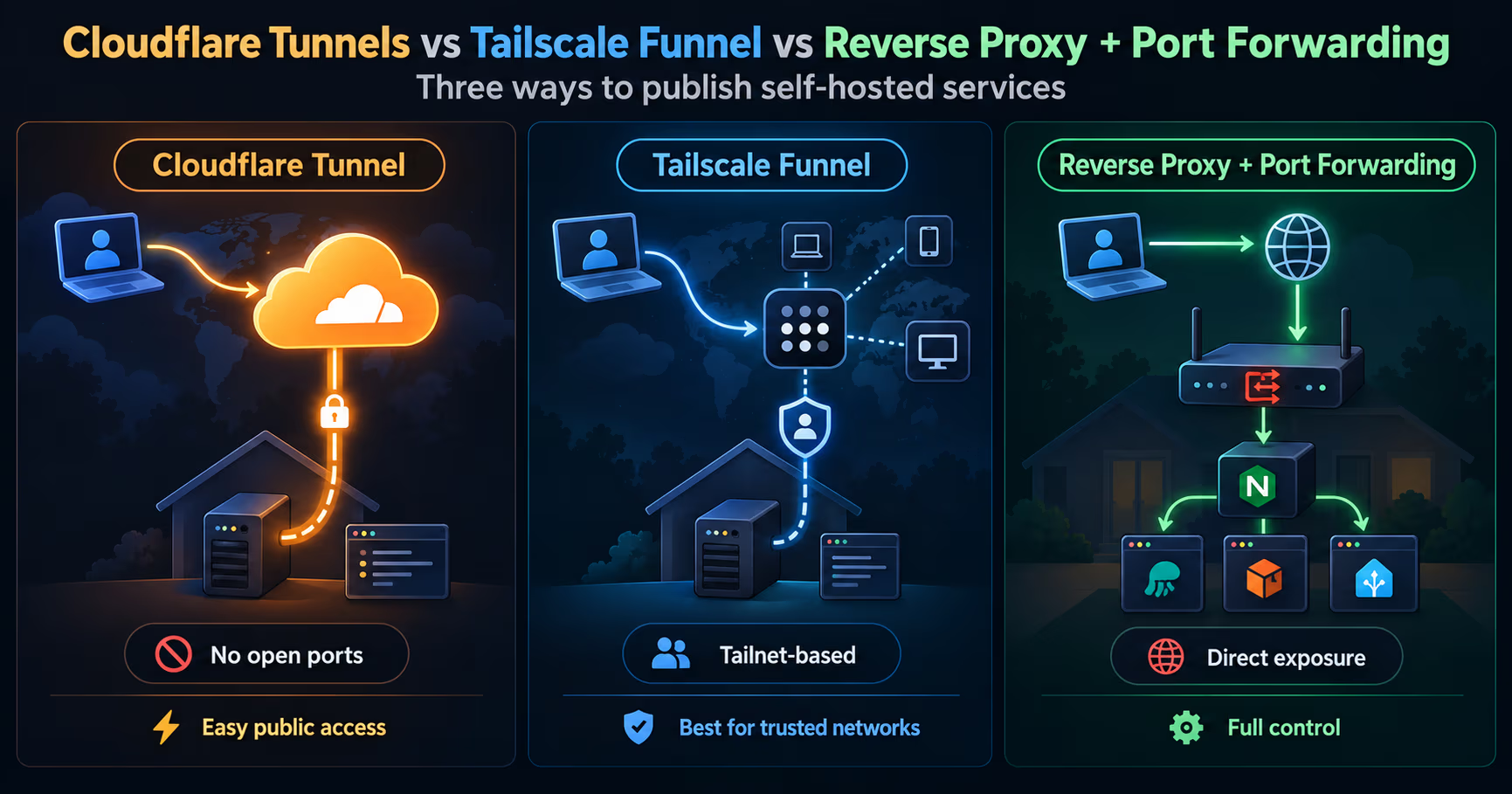
Most comparisons of Cloudflare Tunnel, Tailscale Funnel, and a plain reverse proxy with port forwarding start with the wrong question. They ask which one is fastest or which one is most secure, then argue about features as if the three were competing brands of the same product. They are not the same kind of thing at all.
The honest framing is architectural: all three answer one question, how does a request from the public internet reach a machine behind NAT? They differ in who dials whom. In the classic setup the world dials you. With Cloudflare Tunnel, your box dials Cloudflare. With Tailscale Funnel, traffic enters your private mesh through a Tailscale ingress first, and only ever rides your existing secure path from there.
That single difference decides what you install, what you maintain, what you trust, and what breaks at 2am. This post walks each of the three on its own terms, lines them up in one table, and then spends the time most comparisons skip: what the choice actually changes in your day-by-day running of the thing.
The short version
- Reverse proxy plus port forwarding is the classic. Your router forwards 80 and 443 to a box, and a proxy terminates TLS and routes by hostname to your services. The whole world can see those open ports on your public IP, forever.
- Cloudflare Tunnel removes inbound ports entirely. A small daemon,
cloudflared, dials out to Cloudflare's network, so your origin exposes nothing. TLS terminates at the Cloudflare edge, certificates renew automatically, and DNS stays in Cloudflare. - Tailscale Funnel is the mesh-native option. Tailscale already connects your devices over WireGuard; Funnel publishes one local service to the internet through a Tailscale ingress, TLS only, on ports 443, 8443, or 10000, under a
ts.netaddress: HTTPS by default, with a TCP forwarder available, and no decryption on the relay, TLS terminates on your machine. - The difference that matters day to day: who operates the front door. Classic means you operate a hole in your router. Cloudflare Tunnel means you lease Cloudflare's front door. Funnel means your front door is your private network, borrowed through a Tailscale relay.
- The decision rule: keep the reverse proxy if you want full control and have a public IP; pick Cloudflare Tunnel to hide the origin and get edge features without opening ports; pick Funnel when you already live in Tailscale and want one service public without building edge infrastructure.
What the classic setup actually is
Reverse proxy plus port forwarding is the setup everyone's first homelab tutorial taught: your router maps a public port to an internal IP and port, and a reverse proxy on the box, Caddy, Traefik, or nginx, terminates TLS and routes requests to the right container by hostname. It is the reference answer, and it is still the right answer in a lot of real situations.
What you are really doing is placing your server on the internet and putting a bouncer in front of it. The proxy is the bouncer: it owns the certificates, handles redirects, adds security headers, and decides which hostname goes to which backend. Everything before the proxy is plumbing you assemble: the port-forward rule, maybe DDNS if your IP changes, a firewall that allows those two ports, and a certificate renewal path.
The costs are the parts you stop noticing until they bite. Your public IP is visible, so scanners find the open ports in minutes and the access logs fill with noise. If your ISP uses carrier-grade NAT, there is no public IP to forward to at all, and the whole approach dies. If your IP is dynamic, you need DDNS plus a DNS TTL short enough to follow it. And because the box is reachable from the internet, the hardening job is entirely yours, the Caddy, Traefik, and Nginx Proxy Manager comparison covers that trade in detail.
What Cloudflare Tunnel actually is
Cloudflare Tunnel inverts the connection. Instead of the world dialing your IP, a daemon named cloudflared runs on your machine and opens outbound-only connections to Cloudflare's global network. Public traffic hits Cloudflare first, and Cloudflare pushes it down the connector to your origin. Nothing listens on your public IP, because you do not need a public IP at all.
That one design decision removes the whole category of home-ISP pain: no port forwarding, no DDNS, no CGNAT problem, no static IP requirement. It also removes the origin from the internet: scanners cannot find a port that does not exist, and the origin's true address never appears in DNS because Cloudflare fronts the hostname. TLS is terminated at the Cloudflare edge with certificates that renew automatically, and the Free plan throws in CDN caching, the managed WAF, unmetered DDoS mitigation, and rate limiting, in limited form on Free: one rule, counted by IP, matching on path only. If you want an identity gate before anything reaches your box, Cloudflare Access sits in the same product line.
The trades are real. Your zone has to move to Cloudflare in full: the partial CNAME setup is a Business or Enterprise feature, so on Free or Pro, full setup is the only option. That means accepting Cloudflare as a dependency and trusting it with your traffic, since TLS terminates at their edge. The limit that actually bites at homelab scale is the request-body cap: Free and Pro plans cap request bodies at 100 MB, which catches people uploading large media or backups. Tunnel count is not a real constraint; the Cloudflare account limits page lists 1,000 cloudflared tunnels per account, the same default on every plan, and a ceiling no homelab approaches; the page notes limits may be increased on Enterprise accounts. The CrowdSec behind Cloudflare post shows where to draw the boundaries once Cloudflare is in front of everything.
What Tailscale Funnel actually is
Tailscale builds a private mesh of your devices on top of WireGuard, with identity and ACLs managed centrally. Within that mesh, tailscale serve publishes a local service (a proxied port, a file, a directory, or static text) so other devices on your tailnet can reach it over HTTPS using your ts.net MagicDNS name. Funnel is the public version of the same move: it tells Tailscale's ingress nodes to accept traffic from the whole internet on that hostname and relay it over your tailnet down to your node.
Funnel is deliberately narrow, and it is still in beta. It is TLS-only on ports 443, 8443, and 10000: HTTPS is the default, and --tcp / --tls-terminated-tcp expose a raw or TLS-terminated TCP forwarder on the same three ports. The documented limitation still applies, though: Funnel only works over TLS-encrypted connections, so the public side must arrive wrapped in TLS; assume a stock client for a non-HTTP protocol will not connect, even if the docs mention SSH and RDP as tailnet-side examples. It can serve four kinds of content: an HTTP reverse proxy target, a file, a directory, or static text. The ts.net name and its certificate are provisioned automatically, so there is no DNS work and no cert renewal. Turning it on is a layered opt-in: your tailnet needs MagicDNS and HTTPS enabled with valid certificates, and the node needs a funnel attribute in the tailnet policy file; running tailscale funnel opens a web interface that asks you to approve enabling Funnel and adds the attribute for you, which is Tailscale's way of making sure you understand what you just did.
And the relay is not a front door in the Cloudflare sense: Funnel relay servers do not decrypt the traffic between public devices and your machine. The encrypted request reaches your machine through the TCP proxy and TLS terminates there, at the Tailscale daemon in HTTPS mode or at your own backend with a raw forwarder, never on Tailscale's infrastructure, which is how Tailscale can say it cannot read what you share. It is also why there is no CDN, no WAF, no caching on the Funnel path: the relay never sees plaintext, so it has nothing to inspect or cache. Tailscale does not position it as a web-scale front door, and bandwidth limits are not published. It is the answer to "I already run Tailscale everywhere and I want to show one thing to the world," not to "I need a production site with DDoS protection."
| Feature | Serve | Funnel |
|---|---|---|
| Who can reach it | Only devices on your tailnet | Anyone on the internet |
| Ports | Any local port you expose | 443, 8443, or 10000 only |
| TLS | Automatic ts.net certificate | Automatic ts.net certificate; TLS only, HTTPS by default |
| Public address | None, MagicDNS name works only inside the tailnet | https://<node>.<tailnet>.ts.net |
| Typical use | Admin UIs, internal tools | Demos, sharing an app publicly |
Who can reach it
- Serve
- Only devices on your tailnet
- Funnel
- Anyone on the internet
Ports
- Serve
- Any local port you expose
- Funnel
- 443, 8443, or 10000 only
TLS
- Serve
- Automatic ts.net certificate
- Funnel
- Automatic ts.net certificate; TLS only, HTTPS by default
Public address
- Serve
- None, MagicDNS name works only inside the tailnet
- Funnel
- https://<node>.<tailnet>.ts.net
Typical use
- Serve
- Admin UIs, internal tools
- Funnel
- Demos, sharing an app publicly
Why they are not rivals
Strip the branding and the three stop being competitors and start being three answers to one question: where is the front door, and who opens it?
The classic setup opens a hole in YOUR router. The proxy is powerful, the control is total, and the exposure is permanent. Cloudflare Tunnel moves the door to Cloudflare's edge: your machine never answers a stranger, because it never listens. Funnel keeps the door inside your own network, and merely borrows a Tailscale ingress so the rest of the internet can knock on it.
That is why "which is more secure" is the wrong axis. The classic setup can be perfectly secure if you harden the proxy, and a tunnel can still leak your origin if you also open other ports. The real axis is what you are willing to operate. The classic setup makes you the front door. The tunnel options make the front door someone else's infrastructure, and you trade control for not having to keep the door yourself. But the privacy half of that trade is not symmetric. Cloudflare terminates TLS at its edge and sees your traffic in plaintext. A Funnel relay cannot: it only passes encrypted bytes, and TLS terminates on your machine, not theirs. On "who can read my traffic," Funnel sits with the classic setup, not with Cloudflare: in both, TLS terminates on hardware you own.
Dimension | Reverse proxy + port forwarding | Cloudflare Tunnel | Tailscale Funnel |
|---|---|---|---|
Inbound ports | 80/443 open on your public IP | none, outbound-only connectors | none, traffic enters via Tailscale ingress |
Public IP needed | yes, or CGNAT pain | no | no |
TLS and certs | you manage (Let's Encrypt or similar) | automatic at the Cloudflare edge, plaintext there | automatic ts.net certificate, TLS terminates on your machine |
DNS | your registrar, plus DDNS if IP changes | full zone in Cloudflare (CNAME setup is Business/Enterprise only) | none to manage, ts.net MagicDNS name |
WAF / CDN / DDoS | you build it or go without | included, even on the Free plan | not included; the relay never sees plaintext |
Origin IP visible | yes | hidden | effectively hidden, nothing inbound |
Bandwidth | your ISP's connection, full control | no published bandwidth cap; the 100 MB request-body limit bites first | unpublished limits, not built for heavy public traffic |
Who sees traffic | you and your ISP | Cloudflare terminates TLS at the edge | you; the relay only passes encrypted bytes |
Cost | free, your hardware | free tier available | free; available on all plans, including paid; in beta |
What the choice changes in the day-by-day
This is where the architectural difference shows up as routine work.
Adding a new service. Classic: edit the proxy config, reload, add a DNS record, and if your IP moved, wait for DDNS. Cloudflare Tunnel: add a public hostname rule in the dashboard or config file pointing at the local port; DNS is already there. Funnel: one command, tailscale funnel --bg 3000, and the URL is printed back at you.
Certificates. Classic: you own the renewal story, though Caddy and Traefik make it nearly automatic. Cloudflare Tunnel: none to think about, the edge renews for you. Funnel: none to think about, the ts.net certificate is provisioned for you.
IP changes and ISP surprises. Classic: a new IP breaks DNS until DDNS catches up, and CGNAT can kill the setup entirely. Both tunnel options shrug; they only need outbound connectivity, which is why they are the standard fix for dynamic IPs and CGNAT.
Security posture. Classic: your box is on the internet, period, and the scanners arrive within minutes of the port opening. Cloudflare Tunnel: nothing is reachable inbound, and you can stack WAF and Access policies in front of the tunnel. Funnel: your mesh stays dark to the internet except for exactly what you funneled, and only while you leave it on. But note that --bg makes the funnel persistent across reboots and Tailscale restarts until you explicitly turn it off; a backgrounded demo can quietly outlive your memory of it.
The 2am call. Classic: it is you, against your router, your proxy, and your ISP. Cloudflare Tunnel: usually Cloudflare's status page, then you. Funnel: Tailscale's status page, then your node.
Access control. Classic: whatever auth your apps provide, plus whatever the proxy adds. Cloudflare Tunnel: Cloudflare Access can sit in front of the tunnel for identity-based login. Funnel: your tailnet's identity and ACL concepts are already the auth fabric; anything you funnel is the deliberate exception.
The limits that bite
- Classic: the open ports are the architecture. You trade permanent exposure for full control. The VPN reality check post makes the same argument about replacing open services with private networks.
- Cloudflare Tunnel: you live in Cloudflare's world. DNS, trust, and traffic all route through one vendor, TLS terminates at their edge, the partial CNAME setup is locked to Business and Enterprise plans, and the 100 MB request-body cap on Free and Pro shows up first for media-heavy self-hosters. Tunnel count is not one of the limits that bite: 1,000 per account is the same default on every plan and more than any homelab reaches.
- Funnel: it is a narrow door, still in beta. TLS only on three fixed ports, HTTPS by default, a TCP forwarder available for traffic that arrives wrapped in TLS,
ts.netaddresses rather than your own domain, unpublished bandwidth limits, and no edge security features, because the relay never sees plaintext and could not inspect or cache the content, whatever it could still do at the TCP level. It is not a front door for a real public product, and treating it as one is how demos become outages.
Which should you pick?
- Classic when you have a stable public IP (or CGNAT is not in your life), you want every protocol and port at your disposal, and you are comfortable being the front door. The proxy comparison is your reading list.
- Cloudflare Tunnel when you are behind dynamic IPs or CGNAT, you want CDN, WAF, and DDoS protection without building them, you want the origin off the internet, or you want identity-based access in front of everything.
- Funnel when you already run Tailscale on the machines in question, the thing you are publishing is one app or a demo, and you want the smallest possible delta from private to public.
- The honest mixed setup: keep a reverse proxy inside the network as your router of hostnames, then tunnel the proxy outward. It composes cleanly with Cloudflare Tunnel: map each public hostname to a tunnel, and the inner proxy still sees the Host header it routes on. Funnel is the exception. It serves only your node's single
ts.netname, so the inner proxy never sees different hostnames to route on; behind Funnel you route by path (--set-path) or split services across its three ports. Most homelabs that outgrow the tutorial end up on the Cloudflare version of this stack, and it is the setup this blog's other networking posts assume.
$ sudo ss -tlnp | grep -E ':(80|443)'
# classic: something listens on your forwarded ports

$ cloudflared tunnel list
# a named tunnel with active connectors means Cloudflare Tunnel

$ tailscale funnel --bg 3000
# Available on the internet: https://node.tailnet.ts.net- cloudflared
current release - Tailscale
current stable - Caddy
2.x
Concept-level behavior verified against the official docs linked in this post on 2026-09-27: the outbound-only tunnel model, Funnel's TLS ports 443/8443/10000, and the Serve vs Funnel scope. Limits, pricing, and versions move fast; reconfirm before you pin anything.
Official sources
- Cloudflare Tunnel: https://developers.cloudflare.com/cloudflare-one/networks/connectors/cloudflare-tunnel/
- Cloudflare Tunnel (main overview): https://developers.cloudflare.com/tunnel/
- Cloudflare account limits: https://developers.cloudflare.com/cloudflare-one/account-limits/
- Tailscale Funnel: https://tailscale.com/docs/features/tailscale-funnel
- Tailscale Serve: https://tailscale.com/docs/features/tailscale-serve
- Introducing Tailscale Funnel: https://tailscale.com/blog/introducing-tailscale-funnel
- Our reverse proxy comparison: https://systhoughts.com/posts/caddy-vs-traefik-vs-nginx-proxy-manager
- Our CrowdSec behind Cloudflare post: https://systhoughts.com/posts/crowdsec-behind-cloudflare-attacker-ip
- Our VPN reality check: https://systhoughts.com/posts/vpn-reality-check-when-they-help-and-where-data-goes
Are you running the classic setup, a Cloudflare Tunnel, a Tailscale Funnel, or the mixed stack? And where did the choice bite you first, at setup time or at the first IP change from your ISP? Drop it in the comments.
Until next time, keep your systems thoughtful.
No comments yet