Every few weeks someone asks me the same question, usually right after a VPN ad: which VPN should I use? The honest answer is that this is the wrong question, and it is the wrong question because almost all VPN marketing is built to sell a subscription, not to match a threat model.
A VPN is one tool that does exactly one job: it moves your traffic from your internet provider's network to the VPN provider's network, encrypted in transit. That single shift has real privacy value in specific situations, and almost zero value in the situations the ads imply.
This post is the field guide on what a VPN actually does, when it helps and when it is wasted money, what no-logs really means and which providers prove it, and a deep comparison of OpenVPN, WireGuard, and the proprietary protocols that have taken over the consumer market.
The short version
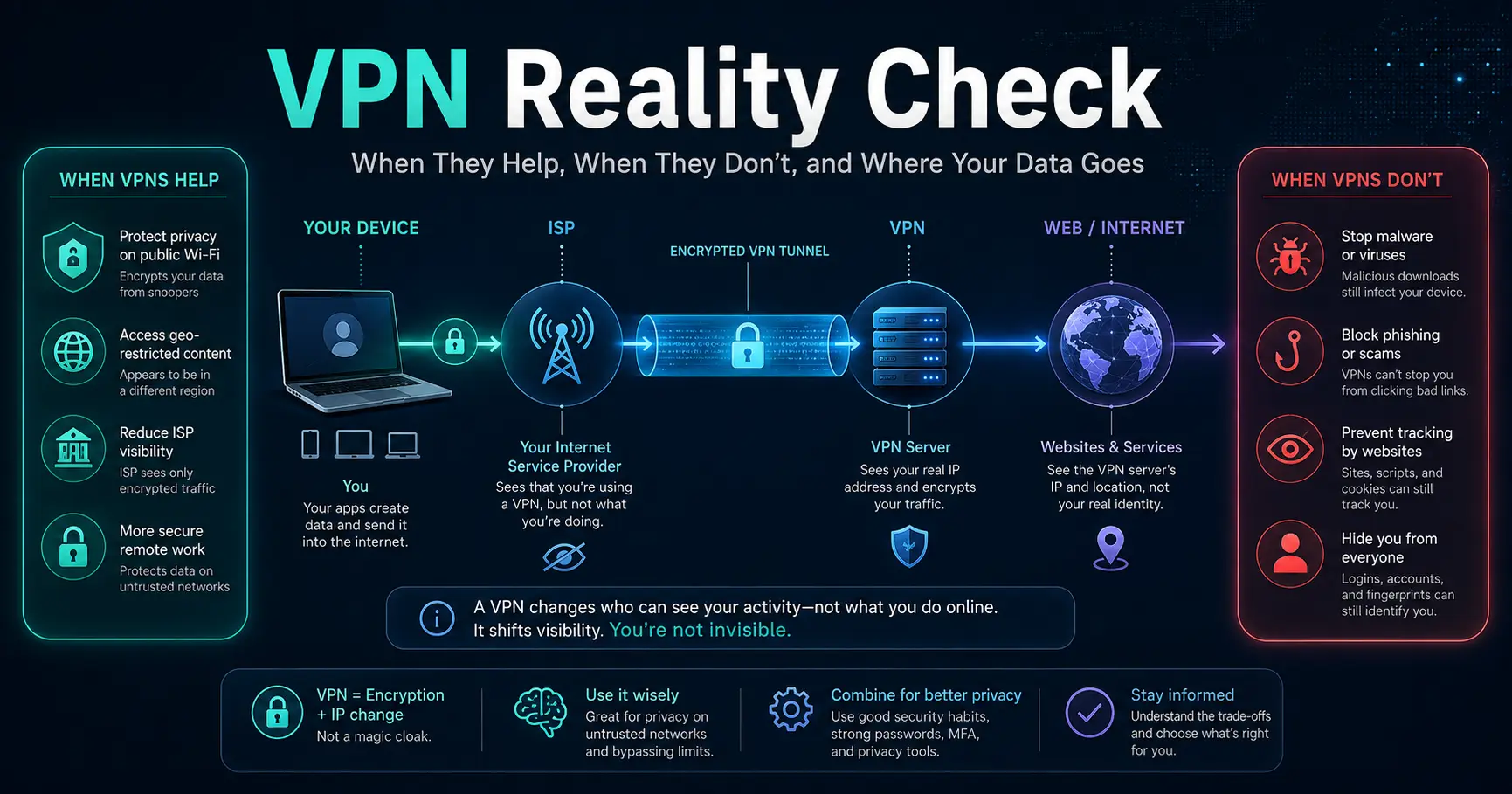
- A VPN moves where your traffic is visible, it does not make you invisible. Your ISP stops seeing the content and the destination, and the VPN provider sees all of it instead. Whoever runs the tunnel is now your network, and you are trusting them the way you used to trust your ISP.
- A VPN does not stop malware, phishing, cookies, or weak passwords. It encrypts the connection, not your behavior. Log in to your Google account through a VPN and Google still knows exactly who you are. Click a phishing link and the VPN encrypts the traffic straight into the scammer's hands.
- "No logs" is a policy claim, not a technical guarantee. What matters is jurisdiction, independent audits, RAM-only servers, and whether the provider has ever been compelled to hand something over. A few providers have been tested in the real world; most have not.
- WireGuard is the modern default, OpenVPN is the battle-tested veteran, and proprietary protocols are mostly marketing with two or three legitimate exceptions. WireGuard's roughly 4,000 lines are auditable and already in the Linux kernel. OpenVPN's roughly 70,000 lines give you configurability and decades of review. NordLynx, Lightway, Catapult Hydra, and Chameleon exist for speed, lock-in, or censorship evasion, not because open protocols are insecure.
- For machine-to-machine work, a self-hosted WireGuard server or a mesh like NetBird beats a consumer VPN subscription. We covered the mesh side in the NetBird vs Pangolin + Newt post, and I will show the self-hosted WireGuard setup below.
- WireGuard
1.0.x, in Linux kernel since 5.6 - OpenVPN
2.6.x - NordLynx
WireGuard-based, double NAT - Lightway
open source, wolfSSL, Cure53 audited - Mullvad
numbered accounts, audits 2023/2025 - Proton VPN
Securitum audits since 2022 - IVPN
annual audit commitment since 2019
Checked 2026-08-22 against wireguard.com, the OpenVPN hardening docs, vendor protocol pages for Nord and Express, Mullvad and Proton and IVPN audit pages, the redact.dev 2025 logging-audit roundup, privacyguides.org's VPN section, and IVPN's protocol comparison. Vendor claims move fast; re-check before you rely on exact numbers.
What a VPN actually does
Strip away the marketing and a VPN is a tunnel. Your device builds an encrypted connection to a server run by someone else, and all your traffic is routed through that server before it reaches the internet. Three things change because of that:
- The ISP loses visibility. Your provider can see that you are connected to the VPN server and how much data flows, but not which sites you visit or what you send.
- The VPN provider gains total visibility. Every unencrypted request, every DNS query, every destination IP passes through their server in plaintext unless the destination itself uses HTTPS. This is the part the ads never mention: the VPN is now your ISP.
- The destination sees the VPN's IP instead of yours. That is what defeats simple geo-blocking and hides your home address from the sites you visit.
One more thing the ads skip: most of the web is already HTTPS. A VPN still hides your destination IPs and your activity from your ISP, but the confidentiality of your bank login, your email, and your shopping cart was already handled by TLS. A VPN is not what protects your passwords from the network; TLS and the destination's certificate are.
When a VPN helps
There are real situations where the tunnel earns its keep:
- Untrusted Wi-Fi. On a hotel or airport network, the VPN stops other guests and the network operator from sniffing your traffic or hijacking your DNS. This is the classic use case and it is still valid, though TLS has quietly reduced how much there is to grab.
- ISP snooping and throttling. If your ISP inspects traffic, sells browsing profiles, or throttles specific services, a VPN removes that visibility. This is a real privacy win in jurisdictions where providers sell data.
- Geo-restrictions, or bans. Streaming catalogs and region-locked services see the exit server's country. This is why most people buy VPNs, and it works, subject to the provider's server locations.
- Censorship circumvention. Where governments block domains or protocols, a VPN is often the difference between a working connection and no connection. Proprietary obfuscation protocols exist for exactly this case.
- Public address hygiene. You keep your home or office IP out of logs you do not control, which matters if you self-host and want to separate that traffic from personal browsing.
When a VPN does not help
This is the list that matters, because this is where the subscription money goes. A VPN does not protect you from:
- Malware and ransomware. A VPN encrypts the download; it does not inspect it. The infected file arrives just as fast. CircleID, Bitdefender, and Cyberfence all say the same thing: a VPN is not an antivirus.
- Phishing and social engineering. If you type your password into a fake login page, the VPN happily encrypts it to the attacker. The channel is secure; the recipient is not.
- Cookies and account tracking. Ad networks track you through cookies and logins, not your IP. VPNs cannot remove cookies already stored in your browser, and services like Google and Facebook know you because you signed in. Security.org is blunt about this: a VPN cannot make you anonymous on the internet.
- Weak or reused passwords. The classic password problems from the mandatory-change post and the SMS 2FA post apply unchanged. A VPN adds nothing here.
- Data already collected. A VPN protects what happens from now on. It does not delete the years of history your ISP, Google, or data brokers already hold. As one privacy write-up put it, a VPN is not a time machine.
- Legal exposure for piracy. Torrenting through a VPN does not make you anonymous. Providers see your traffic, and your account and payment method link sessions to you. PureVPN handed logs to the FBI in a cyberstalking case in 2017, and HideMyAss handed over IP logs to a UK court. If the activity is illegal, the VPN is not a defense.
Call it what it is: a VPN shifts visibility from one party to another, and the destination and the logged-in services still see you. For anonymity, the honest tools are Tor, not a commercial VPN, a point the ghostery and privacyguides write-ups both make.
Where the data goes: what VPNs actually log
The second question the ads avoid is the logging question. Here is the useful mental model: there are two kinds of logs.
- Connection or metadata logs. The provider knows which account, which server, which source IP, when you connected, for how long, and how much data you moved. The Redact 2025 audit roundup is explicit that a single retained IP address or timestamp can de-anonymize everything else. Metadata is not harmless.
- Activity logs. Browsing history, downloads, app usage. Any provider that logs this is lying about no-logs, and free VPNs are the usual offenders, because that data is their business model.
A real no-logs policy means the provider technically cannot hand over what it does not have. That is why the technical details matter more than the policy page:
- RAM-only servers. If the only copy of session state lives in memory, a power cut or a physical seizure produces nothing. ExpressVPN runs a RAM-only fleet, and Mullvad's servers were designed the same way.
- Independent audits. A security firm reviews the code and infrastructure and confirms the logging claims. The useful audits are the no-logs and infrastructure audits, not the marketing-tinted performance reviews.
- Real-world tests. Mullvad's servers were seized by Swedish police in April 2023 and produced nothing, which is the strongest evidence a provider can offer. PIA has answered US subpoenas with no logs. NordVPN's 2018 server breach leaked no user data.
- Jurisdiction. Where the company is incorporated matters, because that is whose law can compel it. A Panama or British Virgin Islands or Switzerland base avoids data-retention mandates, but the roundup's conclusion is worth quoting: jurisdiction is not immunity, and it only helps if the provider technically cannot store the data in the first place.
There is also the unglamorous baseline: the provider always knows your account, your payment method, and usually your email. Mullvad is the exception that proves the rule, with numbered accounts and no email at all. Everyone else's "anonymous" is "anonymous after you hand us your credit card."
Which VPNs are the safest
The honest answer is that "safest" is decided by three things, in order: does the provider collect the minimum possible data, has that claim been independently audited, and has it ever been tested under pressure. The privacy-focused community converges on a short list, and it is not the list the ads push. Here is the current picture, compiled from the providers' own audit pages, privacyguides.org, and the 2025 logging roundup:
Provider | HQ (eyes alliance) | Latest independent audit | Standout fact |
|---|---|---|---|
Mullvad | Sweden (14-Eyes) | Assured AB infra audit 2023, account/payment audit 2025 | Numbered accounts, no email; police raid in 2023 seized nothing |
Proton VPN | Switzerland | Securitum annually since 2022 | Open-source clients, Swiss privacy law |
IVPN | Gibraltar | Multiple audits since 2019, annual commitment | Owns hardware, publishes anti-censorship transparency |
ExpressVPN | British Virgin Islands | KPMG ISAE 3000 Type I, Feb 2025 | RAM-only fleet; split-tunneling DNS leak found and patched in 2024 |
NordVPN | Panama | Deloitte, Dec 2024 (5th) | 2018 server breach leaked no user logs |
Private Internet Access | USA (5-Eyes) | Deloitte, Apr 2024 | US subpoenas produced no logs |
Surfshark | Netherlands (9-Eyes) | Deloitte, Jan 2023 | TunnelCrack leak patched within a week |
Windscribe | Canada (5-Eyes) | Cure53 server audit 2022 | 2025 Greek and Canadian court cases upheld no-logs stance |
Hotspot Shield | USA (5-Eyes) | No dedicated no-logs audit | The cautionary tale: speed king, privacy laggard |
My rule of thumb for the commercial choice: Mullvad and Proton VPN are the defaults I recommend to people who want a consumer VPN, because both minimize data by design and both prove it with audits and real-world tests. IVPN is the same category for people who want annual audit discipline and hardware ownership.
ExpressVPN and NordVPN are the mainstream options with serious audit trails, and they are fine, just heavier on metadata by design and much heavier on marketing.
What I do not recommend: any free VPN that is not Proton's free tier, and any provider whose only evidence is a homepage promise. The 1.2 TB of "no-logs" data exposed from seven Hong Kong VPN services in 2020 is the reminder that the label means nothing on its own.
OpenVPN vs WireGuard vs proprietary protocols, in depth
Now the part this blog exists for: what the protocols actually are and how they differ.
WireGuard: the modern default
WireGuard is a VPN protocol designed by Jason Donenfeld and merged into the Linux kernel in 2020 (kernel 5.6). Its defining property is minimalism. The whole protocol is roughly 4,000 lines of code, versus roughly 70,000 for OpenVPN, a number both Palo Alto Networks and the Tencent Cloud guide cite.
Technically, WireGuard:
- Uses the Noise_IK handshake from the Noise Protocol Framework, completing in a single round trip, under 100 milliseconds in practice.
- Uses ChaCha20 for encryption, Poly1305 for authentication, Curve25519 for key exchange, BLAKE2s for hashing, and SipHash for keyed hashing of packet identifiers.
- Runs over UDP only, with no TCP mode. This is what makes it fast and roaming-friendly, and it means the protocol does not disguise itself as ordinary web traffic.
- Has no configurable cryptography. The cipher suite is fixed. That is the feature: there is nothing to misconfigure, which removes an entire class of misconfiguration bugs.
- Is built into the kernel, so it does not copy packets between kernel and user space the way userland VPNs do.
IVPN's protocol comparison, written after WireGuard hit 1.0, says it has no known major vulnerabilities and is ready for wide-scale use. The one privacy caveat is architectural: WireGuard assigns each peer a static internal IP, and a stock WireGuard server keeps a peer table mapping public keys to those addresses. A commercial provider offering stock WireGuard can therefore correlate a subscriber's identity with a session address, which is exactly why NordLynx exists. We will get to that.
OpenVPN: the battle-tested veteran
OpenVPN has been the industry standard for nearly two decades. It is a userland application that builds the tunnel over TLS, usually through OpenSSL, and it is deliberately flexible:
- It runs over TCP or UDP, which is why it survives restrictive networks better than UDP-only WireGuard.
- It supports a wide range of ciphers and TLS versions, including TLS 1.3 with OpenSSL 3.
- It offers tls-auth, a pre-shared HMAC key that lets a server drop UDP packets that do not carry the correct signature before they even reach the TLS handshake, a cheap DoS and probing defense. The OpenVPN hardening guide covers this in detail.
- The cost of that flexibility is surface area: thousands of configuration options, and the security of a deployment depends on the person who wrote the config. Historically, misconfigured OpenVPN setups have been a bigger risk than OpenVPN itself.
IVPN's verdict is that OpenVPN is an excellent choice for all platforms, extremely fast, secure, and reliable, with the caveat that its configurability is both the strength and the risk. For a sysadmin who wants control, that is a feature. For a consumer app, it is why providers quietly moved everyone to WireGuard.
The comparison
| Feature | OpenVPN | WireGuard |
|---|---|---|
| Code size | Roughly 70,000 lines | Roughly 4,000 lines |
| Handshake | TLS handshake via OpenSSL | Noise_IK, one round trip |
| Crypto | Configurable, TLS 1.3 with OpenSSL 3 | Fixed: ChaCha20, Poly1305, Curve25519, BLAKE2s |
| Transport | TCP and UDP | UDP only |
| Anti-DoS | tls-auth HMAC pre-shared key | Cookie reply mechanism |
| Runtime | Userland, config-heavy | In kernel (Linux 5.6+) |
| Attack surface | Larger, depends on config | Minimal, nothing to misconfigure |
| Audit history | Two decades of public review | Newer, no known major vulnerabilities |
| Privacy caveat | Depends entirely on config and provider | Static peer IPs; provider can correlate sessions |
Code size
- OpenVPN
- Roughly 70,000 lines
- WireGuard
- Roughly 4,000 lines
Handshake
- OpenVPN
- TLS handshake via OpenSSL
- WireGuard
- Noise_IK, one round trip
Crypto
- OpenVPN
- Configurable, TLS 1.3 with OpenSSL 3
- WireGuard
- Fixed: ChaCha20, Poly1305, Curve25519, BLAKE2s
Transport
- OpenVPN
- TCP and UDP
- WireGuard
- UDP only
Anti-DoS
- OpenVPN
- tls-auth HMAC pre-shared key
- WireGuard
- Cookie reply mechanism
Runtime
- OpenVPN
- Userland, config-heavy
- WireGuard
- In kernel (Linux 5.6+)
Attack surface
- OpenVPN
- Larger, depends on config
- WireGuard
- Minimal, nothing to misconfigure
Audit history
- OpenVPN
- Two decades of public review
- WireGuard
- Newer, no known major vulnerabilities
Privacy caveat
- OpenVPN
- Depends entirely on config and provider
- WireGuard
- Static peer IPs; provider can correlate sessions
Both are strong. The honest summary: WireGuard is the better default for almost everything in 2026, OpenVPN is the right tool when you need TCP, fine-grained control, or compatibility with an existing setup. If a provider offers both, pick WireGuard for speed and simplicity, and keep OpenVPN as the fallback for hostile networks.
Proprietary protocols: why they exist, and when they are legitimate
This is the part of the market the ads love, so let me be precise about each one.
- NordLynx (NordVPN). NordLynx is WireGuard with a double-NAT layer added. The WireGuard protocol itself runs unmodified, same Noise_IK handshake, same ChaCha20-Poly1305, and the double NAT assigns every user the same internal IP on the first interface and a temporary per-session address on the second, so the server's peer table no longer links an identity to a traffic path. That solves WireGuard's static-IP privacy caveat. The important caveat from the security.stackexchange and encapsulated.network analyses: the double-NAT layer is proprietary and has never had a published independent technical audit, only the logging outcomes have been independently verified. It is a reasonable engineering answer, but you are taking Nord's word for the part that is not WireGuard.
- Lightway (ExpressVPN). Lightway is the most defensible proprietary protocol, because it is open source. The lightway-core repository is public, it uses the audited wolfSSL cryptography library, and Cure53 audited the code in 2022, finding 9 issues, none critical. It is designed for fast reconnects and low latency on mobile. If ExpressVPN is the choice, Lightway is not a black box, which puts it in a different category from the rest of this list. ExpressVPN did have Lightway re-audited when it rewrote the protocol in Rust in 2025 (by Cure53 and Praetorian).
- Catapult Hydra (Hotspot Shield, AnchorFree, also licensed to Bitdefender VPN). Hydra is closed source and built for speed on poor networks, with its own transport over UDP. The independent coverage is thin: Bitdefender's own explainer notes it lacks obfuscation capabilities, and the logging roundup flags Hotspot Shield as the provider with no dedicated no-logs audit. Speed without transparency is a bad trade.
- Chameleon (VyprVPN). Chameleon is an OpenVPN variant that scrambles OpenVPN packet metadata to defeat deep packet inspection, useful in censorship regimes like China or Iran. It keeps AES-256. Legitimate purpose, closed implementation.
- Mimic (Norton) and NordWhisper (NordVPN). The newest entries, both aimed at DPI evasion and blocked-network survival. Mimic is Norton's proprietary protocol, NordWhisper is Nord's answer to networks that block WireGuard and OpenVPN outright.
The pattern is consistent: proprietary protocols exist for performance tuning and censorship evasion, not because open protocols are insecure. Every one of them either wraps an open protocol or inherits its crypto. When a provider says "our proprietary protocol is more secure," that is marketing; when it says "our proprietary protocol gets through blocked networks faster," that is engineering.
The open protocols win on verifiability, the proprietary ones win on features the open ones do not offer yet, and the two exceptions worth trusting are Lightway, because it is audited and open, and NordLynx, because the audited parts matter and the wrapper is straightforward, though still closed.
| Feature | OpenVPN / WireGuard | NordLynx, Lightway, Hydra, Chameleon |
|---|---|---|
| Source | Public, anyone can audit | Mostly closed; Lightway is the exception |
| Third-party clients | Every platform, every app | Only the vendor's app |
| Real purpose | Security and interoperability | Speed tuning, lock-in, DPI evasion |
| Audit status | Decades of public review | Lightway Cure53 audited; NordLynx wrapper not technically audited |
| Censorship evasion | Weak by design | Strong, this is the point |
| Verdict | The default; verifiable | Use for specific features, not for 'more secure' |
Source
- OpenVPN / WireGuard
- Public, anyone can audit
- NordLynx, Lightway, Hydra, Chameleon
- Mostly closed; Lightway is the exception
Third-party clients
- OpenVPN / WireGuard
- Every platform, every app
- NordLynx, Lightway, Hydra, Chameleon
- Only the vendor's app
Real purpose
- OpenVPN / WireGuard
- Security and interoperability
- NordLynx, Lightway, Hydra, Chameleon
- Speed tuning, lock-in, DPI evasion
Audit status
- OpenVPN / WireGuard
- Decades of public review
- NordLynx, Lightway, Hydra, Chameleon
- Lightway Cure53 audited; NordLynx wrapper not technically audited
Censorship evasion
- OpenVPN / WireGuard
- Weak by design
- NordLynx, Lightway, Hydra, Chameleon
- Strong, this is the point
Verdict
- OpenVPN / WireGuard
- The default; verifiable
- NordLynx, Lightway, Hydra, Chameleon
- Use for specific features, not for 'more secure'
Hands-on: a self-hosted WireGuard server
For sysadmins, the most useful VPN is often the one you run yourself. You own the server, so the logging question answers itself, and WireGuard makes the setup a ten-minute job. This is the pattern I use alongside the mesh setup from the NetBird vs Pangolin post, which is the better tool for remote access to many machines. A plain WireGuard server is the better tool when you want one exit point and full control.
$ sudo apt install wireguard

# generate the server keypair
$ umask 077 && wg genkey | tee server.key | wg pubkey > server.pub

# write the server config
$ sudo tee /etc/wireguard/wg0.conf <<EOF
[Interface]
Address = 10.0.0.1/24
ListenPort = 51820
PrivateKey = <paste server.key>

# optional: push DNS to clients, or they keep their ISP resolver
# PostUp = iptables -t nat -A POSTROUTING -o eth0 -j MASQUERADE
# PostDown = iptables -t nat -D POSTROUTING -o eth0 -j MASQUERADE
EOF

# enable forwarding, bring the tunnel up, make it permanent
$ sudo sysctl -w net.ipv4.ip_forward=1
$ sudo wg-quick up wg0
$ sudo systemctl enable wg-quick@wg0

# add a client peer
$ sudo wg set wg0 peer <client.pub> allowed-ips 10.0.0.2/32$ sudo apt install wireguard
$ umask 077 && wg genkey | tee client.key | wg pubkey > client.pub
# /etc/wireguard/wg0.conf on the client
[Interface]
Address = 10.0.0.2/24
PrivateKey = <paste client.key>
[Peer]
PublicKey = <server.pub>
Endpoint = your-server.example.com:51820
AllowedIPs = 0.0.0.0/0
$ sudo wg-quick up wg0
$ curl ifconfig.me # your server's IP now
$ sudo wg show # latest handshake, transfer countersTwo things most guides forget:
- DNS. WireGuard does not touch DNS. Without a DNS line in the config, your resolver is still your ISP's, and your ISP can still see every domain you visit even though it cannot see the traffic. Route DNS through the tunnel, or accept that DNS metadata leaks. This is the same class of leak as the IPv6 problem: the tunnel is only as private as everything else that leaves the machine.
- The exit is still a point of trust. Your VPS provider sees the exit traffic. You traded your ISP for a cloud provider. That is usually a win on paper, because you control the server and its logging, but it is not anonymity, exactly as the commercial case.
The decision rule
- Use a commercial, audited VPN (Mullvad, Proton VPN, IVPN are my defaults) when you want a consumer privacy tool with minimal data collection and proof behind it. It is a subscription for privacy, not for security.
- Run your own WireGuard server when you want an exit you control, for a handful of devices, and you can accept that the VPS provider is the new ISP. Add a mesh like NetBird or Tailscale when you need site-to-site and many-machine access, the subject of the NetBird vs Pangolin post.
- Use OpenVPN when you need TCP, strict configurability, or compatibility with legacy clients. WireGuard for everything else.
- Consider a proprietary protocol only for its real feature: DPI evasion or mobile reconnect speed, and even then prefer Lightway, the one that is open and audited.
- Skip the VPN entirely when the problem is malware, phishing, or passwords. Those need antivirus, awareness, and the authentication hygiene from the SMS 2FA and password-change posts, not a tunnel.
Official sources
- WireGuard protocol and cryptography: https://www.wireguard.com/protocol/
- WireGuard in the Linux kernel and the 4,000-line design: https://www.wireguard.com/ and the whitepaper linked there
- OpenVPN hardening guide (tls-auth, TLS options): https://openvpn.net/community-docs/hardening-openvpn-security.html
- IVPN protocol comparison, PPTP vs IPSec vs OpenVPN vs WireGuard: https://www.ivpn.net/en/pptp-vs-ipsec-ikev2-vs-openvpn-vs-wireguard/
- Palo Alto Networks, WireGuard vs OpenVPN: https://www.paloaltonetworks.com/cyberpedia/wireguard-vs-openvpn
- Redact, VPN logging policies 2025 (audit table and no-logs reality): https://redact.dev/blog/vpn-logging-policies-2025
- Mullvad no-logging policy: https://mullvad.net/en/help/no-logging-data-policy
- Mullvad VPN server audit, no information leakage: https://mullvad.net/en/blog/vpn-server-audit-found-no-information-leakage-or-logging-of-customer-data
- Privacy Guides, VPN services: https://www.privacyguides.org/en/vpn/
- ExpressVPN Lightway Core (open source): https://github.com/expressvpn/lightway-core
- Lightway goes open source with a Cure53 audit (Tom's Guide): https://www.tomsguide.com/news/expressvpns-lightway-protocol-goes-open-source-alongside-fresh-security-audit
- NordLynx, how the double NAT works (NordLayer): https://nordlayer.com/features/nordlynx/
- NordLynx and the WireGuard static-IP problem (encapsulated.network): https://encapsulated.network/what-is-nordlynx/
- VPN limitations, what it cannot protect (CircleID): https://circleid.com/guides/vpn-limitations
- Does a VPN protect you from hackers (Bitdefender): https://www.bitdefender.com/en-us/blog/hotforsecurity/does-a-vpn-protect-you-from-hackers
- Can you be tracked if you use a VPN (Ghostery): https://www.ghostery.com/blog/can-you-be-tracked-if-you-use-a-vpn
- Our remote-access comparison: https://systhoughts.com/posts/netbird-vs-pangolin-newt
Are you running a consumer VPN, a self-hosted WireGuard box, or a mesh, and which protocol did you settle on? Have you ever caught a DNS or IPv6 leak in testing? Drop it in the comments.
Until next time, keep your systems thoughtful.
No comments yet