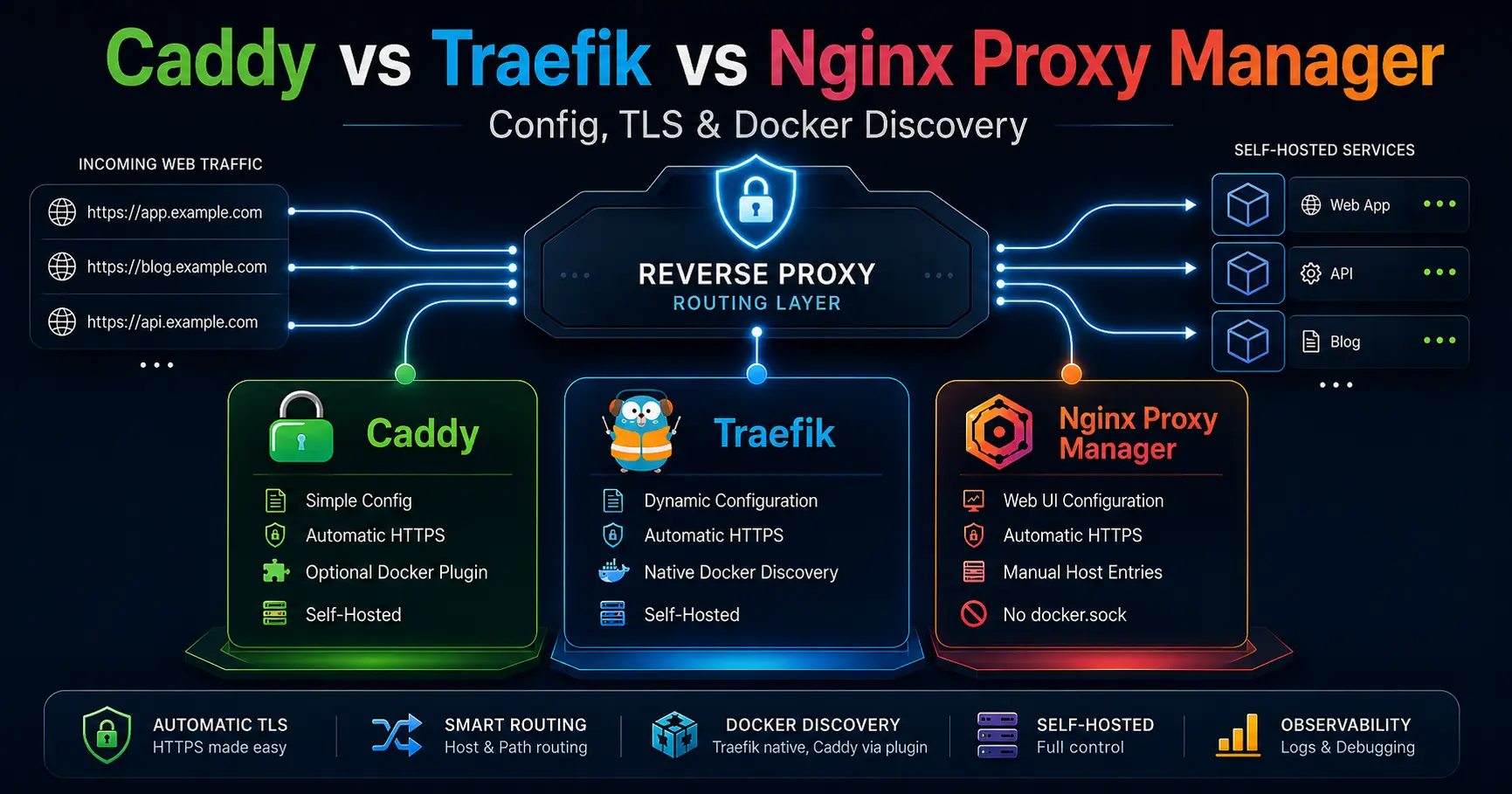
Caddy vs Traefik vs Nginx Proxy Manager for Self-Hosting: Config, TLS, and Docker Discovery, Hands-On
If you run more than two self-hosted services, you eventually ask which reverse proxy should stand in front of them. The homelab conversation has converged on three answers: Caddy, Traefik, and Nginx Proxy Manager (NPM). All three terminate TLS and forward HTTP, so the useful comparison is not a feature table, it is the operational model behind each one: how you describe a route, how a certificate gets onto a domain, how a container becomes a website, and how much of that pipeline you can debug at 2 AM.
This post is the sysadmin version of that comparison. I cover the config model each tool actually uses, how automatic TLS works in practice, how Docker discovery does or does not happen, where the security boundaries sit (including the docker.sock question most tutorials skip), the debugging commands that matter, and the honest answer to when GUI convenience stops scaling. If you are still deciding where a reverse proxy fits in your stack at all, the Compose vs Kubernetes post and the Docker vs Podman post cover the surrounding decisions.
The short version
- Caddy is the zero-ceremony option. One small Caddyfile, HTTPS on by default, certificates obtained and renewed automatically, and an admin API that makes reloads safe. It is the only one of the three that turns TLS on without asking.
- Traefik is the automation-first option. Static config for entrypoints and ACME resolvers, dynamic config from Docker labels, and a dashboard that shows exactly what the proxy thinks it is routing. It is the best of the three when containers come and go.
- NPM is the GUI-first option. A web form per host, certificates requested per domain in the UI, access lists and redirects managed by clicking. It is the lowest-friction on-ramp, and it is the only one of the three that does not need the Docker socket.
- The docker.sock boundary is the real security story. Traefik and Caddy's Docker discovery both read the Docker socket, which is effectively root. NPM does not mount it at all, which is a genuine win for its use case.
- The GUI ceiling is real and it lands early. Somewhere around ten to twenty hosts, per-form configuration stops being convenient and becomes a tax. That is the point where config-as-code stops being a preference and starts being the answer.
- Caddy
2.11.x (2.11.3 latest patch seen at time of writing) - Traefik
v3.7.11 (latest) - Nginx Proxy Manager
v2.15.1 (latest) - caddy-docker-proxy
community plugin; labels prefixed caddy
Checked 2026-08-27 against the GitHub releases pages for caddyserver/caddy, traefik/traefik, and NginxProxyManager/nginx-proxy-manager, the official Caddy automatic HTTPS docs, the Traefik v3 Docker provider and ACME docs, and nginxproxymanager.com. All three projects ship fast; re-check versions before you rely on them.
What each tool actually is
Caddy
Caddy is a web server written in Go, distributed as a single static binary, and it is the only one of the three that turns HTTPS on by default. Point it at a public domain and it obtains a Let's Encrypt certificate on its own, redirects HTTP to HTTPS, and renews the certificate before expiry. The config file is the Caddyfile, a small text format that reads like English, which Caddy adapts into JSON and serves through the admin API on localhost:2019. That API is the same mechanism behind caddy reload, which swaps the running configuration without dropping connections.
Traefik
Traefik is also written in Go, but its model is split in two. Static configuration covers the parts that change rarely: entrypoints, providers, and ACME certificate resolvers. Dynamic configuration comes from providers for everything that changes often: routers, services, and middlewares. The Docker provider turns container labels into routes, so a container that starts with the right labels is proxied automatically, with no reload and no restart. The dashboard on port 8080 shows the live router state, which makes Traefik the best of the three for inspecting what the proxy believes it is doing at any moment.
Nginx Proxy Manager
NPM is a web UI wrapped around nginx and OpenResty. You add a proxy host in a browser form: domain, forward host, port, certificate, access list, done. The UI writes the nginx configuration for you, stores its state in SQLite or MariaDB, and exposes a REST API for the same operations. It is the gentlest on-ramp of the three, and it is the only one that does not need the Docker socket, which matters more than most tutorials admit.
The config model: files, labels, and a web form
The three tools answer the same question, "where is a route defined?", in three different places. That single decision drives almost everything else in this comparison.
Caddy defines a route in a Caddyfile. One site block per domain, and the directives read like what they do:
# /etc/caddy/Caddyfile
example.com {
    reverse_proxy 127.0.0.1:8080
}

# wildcards need an explicit tls block with a DNS challenge
*.example.com {
    tls {
        dns <provider> <api-token>
    }
    reverse_proxy 10.0.0.5:8080
}
Traefik defines routes as labels on the container itself. The static side lives in the compose service, and the dynamic side lives next to the workload:
services:
  traefik:
    image: traefik:v3.7.11
    command:
      - "--providers.docker=true"
      - "--providers.docker.exposedbydefault=false"
      - "--providers.docker.network=proxy"
      - "--entrypoints.web.address=:80"
      - "--entrypoints.websecure.address=:443"
      - "--certificatesresolvers.letsencrypt.acme.email=you@example.com"
      - "--certificatesresolvers.letsencrypt.acme.storage=/letsencrypt/acme.json"
      - "--certificatesresolvers.letsencrypt.acme.httpchallenge.entrypoint=web"
      - "--api.dashboard=true"
    ports:
      - "80:80"
      - "443:443"
      - "8080:8080"
    volumes:
      - "/var/run/docker.sock:/var/run/docker.sock:ro"
      - "./letsencrypt:/letsencrypt"

  whoami:
    image: traefik/whoami
    labels:
      - "traefik.enable=true"
      - "traefik.http.routers.whoami.rule=Host(`whoami.example.com`)"
      - "traefik.http.routers.whoami.entrypoints=websecure"
      - "traefik.http.routers.whoami.tls.certresolver=letsencrypt"
NPM defines routes as rows in a web form, backed by SQLite or MariaDB, with the nginx config generated for you. The same operation exists through the REST API, which is the automation path for the GUI-first crowd:
$ curl -X POST http://localhost:81/api/tokens \
  -H 'Content-Type: application/json' \
  -d '{"identity":"admin@example.com","secret":"your-new-password"}'
The practical difference: Caddy and Traefik give you a diffable, versionable text artifact that git can own, which is exactly the workflow the release-tracking post recommends for everything else you run. NPM gives you a database that only the UI understands, which is fine until you want to reproduce a host from a pull request.
Automatic TLS: who makes HTTPS boring
All three tools speak ACME and can put Let's Encrypt certificates on your domains. The difference is who does the paperwork.
Caddy makes TLS a default, not a feature. A public hostname in a Caddyfile gets a certificate with no extra configuration. Caddy handles HTTP-01 and TLS-ALPN challenges, renews early, and even provisions an internal CA for local names that have no public DNS. Wildcards are the one case that needs explicit work: a tls block with a DNS challenge provider, or the internal CA if you only need it inside your network.
Traefik makes TLS explicit per router. You declare a certificate resolver once in the static config with the ACME email, the storage file, and the challenge entrypoint, then each router opts in with a certresolver label. The acme.json storage file must be mode 600, because it contains private keys. This is more ceremony than Caddy, and it is deliberate: Traefik wants you to know which router gets which certificate.
NPM makes TLS a per-host button. Open a proxy host, go to the SSL tab, request a certificate, done. Renewal is automatic. For wildcards you pick the DNS challenge and supply the provider credentials in the form. It is the easiest mental model for a small number of domains, and it is also the most manual when you have dozens of them.
Docker discovery: labels, plugins, and manual entries
This is where the three stop being interchangeable.
Traefik discovers containers natively. The Docker provider watches the socket, reads labels, and reconfigures itself as containers start and stop. The exposedbydefault=false flag is the important one: it means a container is only routed when it explicitly opts in with traefik.enable=true, which keeps accidental exposure from being the default. Put Traefik and your workloads on a dedicated external network so the proxy only sees the containers you intend.
Caddy discovers containers through a plugin. The built-in Caddy has no Docker provider, but the community caddy-docker-proxy plugin fills the gap by translating labels prefixed with caddy into Caddyfile snippets. The {{upstreams 80}} placeholder resolves to the container's address on the proxy network:
services:
  caddy:
    image: lucaslorentz/caddy-docker-proxy:ci-alpine
    ports:
      - "80:80"
      - "443:443"
    volumes:
      - "/var/run/docker.sock:/var/run/docker.sock:ro"
      - "caddy_data:/data"

  whoami:
    image: traefik/whoami
    labels:
      - "caddy=whoami.example.com"
      - "caddy.reverse_proxy={{upstreams 80}}"
NPM does not do discovery. Every host is a manual entry, which is perfectly fine for a stable set of services and increasingly tedious for anything ephemeral. If your containers change often, you either script the NPM API or you admit that the label-based model is what you actually wanted.
Security boundaries: what each one trusts
The security conversation around reverse proxies is dominated by one fact: the Docker socket is root. Traefik's Docker provider and caddy-docker-proxy both need to read /var/run/docker.sock to see your containers, and any process that can talk to that socket can start privileged containers, mount host paths, and read secrets.
Read-only mounting reduces the blast radius, and a dedicated socket proxy such as tecnativa/docker-socket-proxy can filter the API down to the operations discovery actually needs. Mounting the socket, even read-only, into a public-facing proxy is a decision you should make with your eyes open.
The rest of the boundary is about admin surfaces. Caddy's admin API binds to localhost by default and can be disabled entirely for a pure config-file deployment. Traefik's dashboard should never run with --api.insecure on a public interface, and the docs say so plainly. NPM ships with the login admin@example.com / changeme and listens on port 81, so the first login is a password change, and port 81 belongs on loopback or behind an access list, not on the open internet.
None of the three is a WAF. They terminate TLS and route requests; the request-filtering layers from the Naxsi post and the network-level blocking from the Fail2ban vs CrowdSec post still belong in front of or beside them. And as with everything else you run, pin the image tag, track releases deliberately, and re-check versions before you rely on a tutorial that is a quarter old.
Debugging: when the route breaks
Every reverse proxy fails the same way eventually: you hit a domain and get 502, 404, or a certificate warning, and you need to know which layer lied. Each tool has a short, honest debug path.
Caddy's trio is validate, adapt, and reload, plus the admin API for live inspection:
$ sudo apt install -y caddy
$ caddy version
v2.11.3

# validate the config before reloading
$ caddy validate --config /etc/caddy/Caddyfile

# reload without dropping connections
$ sudo systemctl reload caddy

# the admin API lives on localhost:2019
$ curl -s http://localhost:2019/config/ | head
Traefik's debug path is the log level and the dashboard. Bump --log.level=DEBUG, watch the discovery logs, and let the dashboard show you whether the router exists and which entrypoint it is on:
$ docker network create proxy
$ docker compose up -d traefik

# watch it discover labeled containers
$ docker logs -f traefik
time=... level=info msg="Configuration loaded" providerName=docker

# a missing route is usually a typo in a label:
# check the dashboard on :8080, then the logs
$ docker compose logs --tail=50 traefik
NPM's debug path is the container logs and the generated config. Every host you add writes nginx config under ./data/nginx, so when a route misbehaves, the generated file shows you exactly what the UI produced:
$ docker compose up -d npm
# admin UI: http://<host>:81
# default login: admin@example.com / changeme (change it now)
$ docker logs -f npm

# generated nginx configs live under ./data/nginx
# nginx error logs live under ./data/logs/nginx
The debugging lesson across all three: a 502 means the proxy is up but the backend is not, a 404 usually means the route pattern does not match, and a certificate warning in 2026 is almost always a staging cert left behind or a DNS challenge that never propagated. Start with the tool's own view of its config, then look at the logs, and only then suspect the network.
The limits that bite
- NPM has no real config-as-code story. The state lives in a database the UI owns. There is an API, but there is no templating, no labels, no diffable history of routes, and versioning the setup is your job. Fine for a stable handful of hosts, painful the day you want routing to come from a pull request.
- Traefik's label vocabulary is large and failures are silent. A typo in a label usually means no route and no error until you open the dashboard and notice the router is missing. The power is real; so is the surface area you have to learn.
- Caddy's automatic HTTPS is only automatic for public DNS names. Internal names, wildcards, and anything behind a NAT that cannot answer challenges need explicit
tlsblocks, and the admin API is powerful enough that you should lock it to loopback or turn it off. - All three terminate TLS, none of them is a WAF or a rate limiter. The filtering layers from the Naxsi post and the edge blocking from the Fail2ban vs CrowdSec post are separate tools that still belong in the stack.
- Version drift bites all of them. Pin the image tag, track releases with the release-tracking workflow, and re-check the verified block above before you build on exact versions.
At a glance
Feature | Caddy | Traefik | Nginx Proxy Manager |
|---|---|---|---|
Stack | Go, single binary | Go, single binary | nginx + OpenResty, web UI |
Config model | Caddyfile adapted to JSON; admin API | Static config + dynamic providers (Docker labels, file, k8s) | Web UI generating nginx config; REST API |
Automatic TLS | On by default, zero config | Per-router certresolver + ACME | Per-host requests in the UI |
Docker discovery | caddy-docker-proxy plugin | Native Docker provider via labels | Manual host entries |
Needs docker.sock | Yes, for label discovery | Yes | No |
Debug surface | validate, adapt, reload, admin API | Dashboard, DEBUG logs, healthcheck | UI logs, container logs, nginx error log |
Wildcard certs | DNS challenge or internal CA | DNS challenge in the resolver | DNS challenge per host |
Best for | Config-as-code with zero TLS ceremony | Automation-first fleets, ephemeral services | A handful of stable hosts, GUI preference |
| Feature | Caddy / Traefik (config-first) | Nginx Proxy Manager (GUI-first) |
|---|---|---|
| Config source | Caddyfile or static YAML plus container labels | Web UI generating nginx config, REST API on top |
| Version control | Config is text you can git | UI state in SQLite or MariaDB; export by hand |
| Docker discovery | Traefik native; Caddy via caddy-docker-proxy | Manual host entries |
| docker.sock needed | Yes for label discovery | No |
| Certificates | Caddy automatic by default; Traefik per-router resolver | Per-host requests in the UI |
| Learning curve | Steeper, pays off at scale | Gentle, hits a ceiling |
| Best for | Automation, fleets, ephemeral containers | A handful of stable hosts |
Config source
- Caddy / Traefik (config-first)
- Caddyfile or static YAML plus container labels
- Nginx Proxy Manager (GUI-first)
- Web UI generating nginx config, REST API on top
Version control
- Caddy / Traefik (config-first)
- Config is text you can git
- Nginx Proxy Manager (GUI-first)
- UI state in SQLite or MariaDB; export by hand
Docker discovery
- Caddy / Traefik (config-first)
- Traefik native; Caddy via caddy-docker-proxy
- Nginx Proxy Manager (GUI-first)
- Manual host entries
docker.sock needed
- Caddy / Traefik (config-first)
- Yes for label discovery
- Nginx Proxy Manager (GUI-first)
- No
Certificates
- Caddy / Traefik (config-first)
- Caddy automatic by default; Traefik per-router resolver
- Nginx Proxy Manager (GUI-first)
- Per-host requests in the UI
Learning curve
- Caddy / Traefik (config-first)
- Steeper, pays off at scale
- Nginx Proxy Manager (GUI-first)
- Gentle, hits a ceiling
Best for
- Caddy / Traefik (config-first)
- Automation, fleets, ephemeral containers
- Nginx Proxy Manager (GUI-first)
- A handful of stable hosts
Which should you pick?
- Choose Caddy when you want config-as-code with zero TLS ceremony: one readable file, automatic certificates,
gitowning your routing, and a small fleet of mostly stable hosts. If your answer to "how does HTTPS happen" should be "it just does", Caddy is the tool. - Choose Traefik when your workload is automation-first: Docker labels, ephemeral containers that should self-register, a fleet that changes shape, Kubernetes, or a proxy that must reconfigure itself without you touching a file. The label vocabulary is the price of that power.
- Choose NPM when you prefer a GUI, you run a handful of stable hosts, non-technical co-admins need to add a route without reading config, and you want to skip the Docker socket entirely. It is the gentlest on-ramp in the category, and the only one with no socket exposure.
- Consider none when a single service on one box is the whole problem. A plain nginx site or a systemd unit is less machinery than any of these, the same argument the Compose vs Kubernetes post makes about clusters, and the Docker vs Podman post makes about runtimes.
My honest read after running all three: Caddy is the best default for most self-hosters who are comfortable in a terminal, Traefik is the right call the day you want containers to register themselves, and NPM is the right call when the person adding routes would rather click than read. The GUI is not a flaw; it is a ceiling, and the ceiling shows up around ten to twenty hosts. When you hit it, the migration is not from one tool to another, it is from forms to files, and that is a one-way door worth walking through deliberately.
Official sources
- Caddy: https://caddyserver.com/
- Caddy automatic HTTPS: https://caddyserver.com/docs/automatic-https
- caddy-docker-proxy: https://github.com/lucaslorentz/caddy-docker-proxy
- Caddy releases: https://github.com/caddyserver/caddy/releases
- Traefik: https://traefik.io/
- Traefik Docker provider: https://doc.traefik.io/traefik/providers/docker/
- Traefik ACME: https://doc.traefik.io/traefik/https/acme/
- Traefik releases: https://github.com/traefik/traefik/releases
- Nginx Proxy Manager: https://nginxproxymanager.com/
- NPM advanced configuration: https://nginxproxymanager.com/advanced-config/
- NPM releases: https://github.com/NginxProxyManager/nginx-proxy-manager/releases
- Our Compose vs Kubernetes post: https://systhoughts.com/posts/docker-compose-vs-kubernetes-self-hosted-apps
- Our Docker vs Podman post: https://systhoughts.com/posts/docker-vs-podman-self-hosted-apps
- Our release-tracking post: https://systhoughts.com/posts/tracking-software-releases-across-forges
- Our network-layer blocking comparison: https://systhoughts.com/posts/fail2ban-vs-crowdsec
- Our nginx WAF post: https://systhoughts.com/posts/naxsi-nginx-waf-anti-xss-sql-injection
Are you running Caddy, Traefik, or NPM in front of your self-hosted stack? Where did the GUI stop scaling for you, and did you move your routes into code? Drop it in the comments.
Until next time, keep your systems thoughtful.
No comments yet