The last post in this little security series covered file integrity and filesystem events: AIDE to prove nothing changed on a schedule, inotify-tools to react the moment a file does. Both are the right tools for the host itself. This post moves one layer up, to the thing the box actually serves: the web application.
If you run WordPress, Joomla, Magento, or any PHP application behind nginx, the attack you are most likely to see is not a changed binary, it is a crafted request. XSS and SQL injection are still the everyday reality of web application attacks, and Naxsi is the classic open-source answer at the nginx layer.
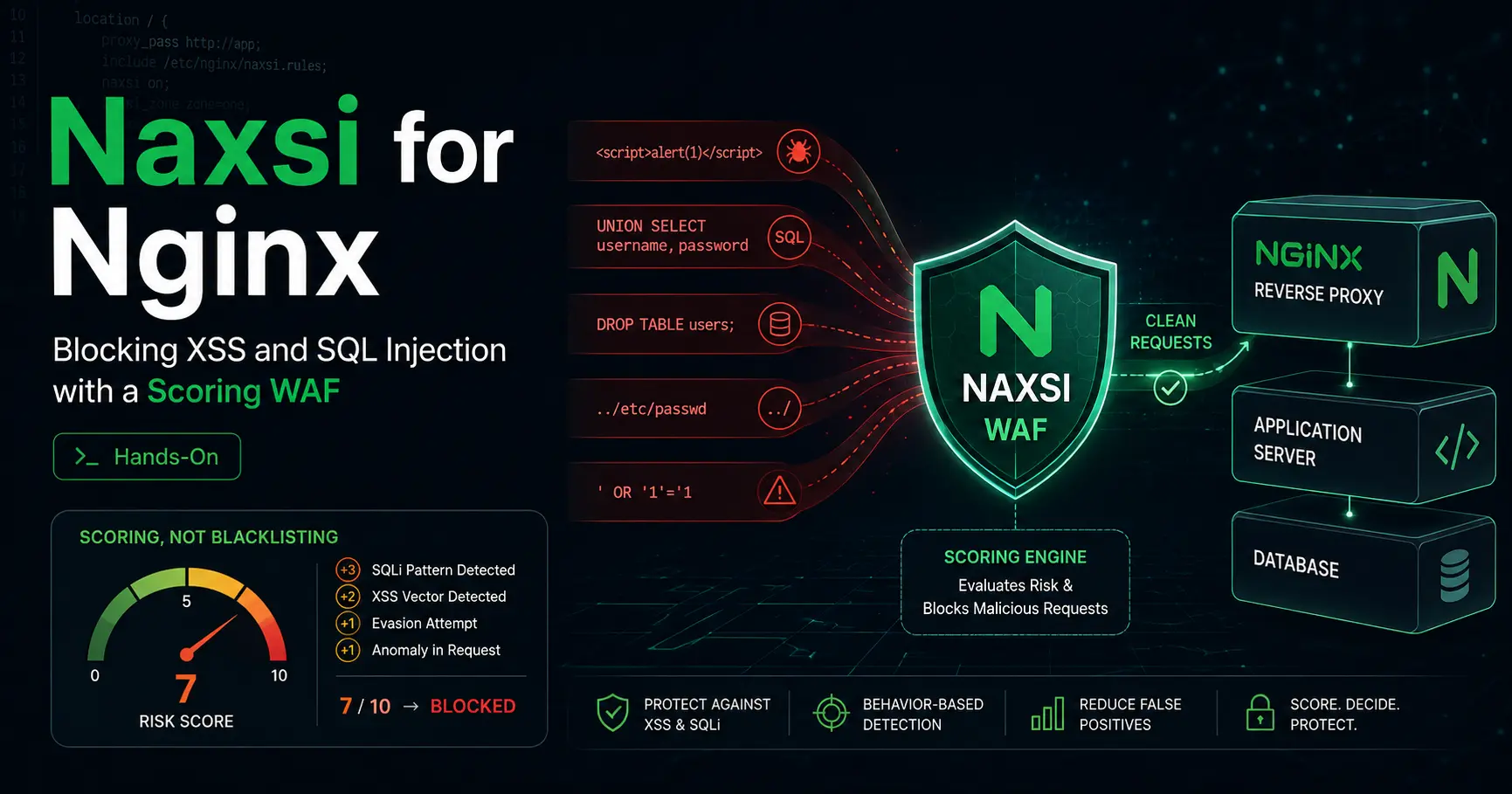
Naxsi means Nginx Anti XSS & SQL Injection. It is a third-party nginx module, and the thing that separates it from most WAFs is the philosophy. Instead of a giant signature database that an unknown payload can slip past, Naxsi reads a small set of simple, readable rules and assigns scores to suspicious patterns. When a request crosses a threshold, it is blocked. Everything that looks dangerous is blocked by default, and your job as the administrator is to whitelist the behavior your application actually needs. Think DROP-by-default firewall, not antivirus.
This post is the hands-on version: what Naxsi actually is, how the scoring model works, how you install it and wire it into nginx on Debian, Ubuntu, and Fedora, how learning mode and nxtool generate your whitelists, what WordPress, Joomla, and Magento need specifically, and the honest limits that most tutorials skip.
The short version
- Naxsi is a scoring WAF, not a signature WAF. Small readable rules assign scores to patterns like
<,|,drop, and SQL keywords. A request is blocked when its score crosses aCheckRulethreshold. There is no database of known attacks to update. - It is deny-by-default. Suspicious patterns are blocked unless you whitelist the exact behavior your app needs. That is the feature and the workload at the same time.
- The original project was archived. nbs-system/naxsi was officially archived on November 8, 2023. The actively maintained fork is wargio/naxsi, run by the last active developer of the original, and it is a single-maintainer project, which is a real bus-factor risk.
- The fork ships as version 1.7. Naxsi 1.7 was released December 26, 2024 with malformed-argument parsing fixes, a libinjection bump, PCRE integration fixes, and new scanner and PHP rules. Fedora packages the module as nginx-mod-naxsi 1.6; Alpine ships nginx-mod-http-naxsi 1.7.
- Ubuntu 20.04+ and current Debian have no prebuilt package, so on modern releases you build the module from source. On Fedora it is one dnf command.
- CMSes like WordPress generate false positives by design. admin-ajax.php, the REST API, and the block editor all look suspicious to a deny-by-default WAF. Learning mode plus whitelists is the whole game, and the WAFPlanet review is blunt that WordPress needs real tuning time.
- Naxsi is one layer. It does not replace patching, file integrity, or the network-layer blocking from the Fail2ban vs CrowdSec post. It sits in front of the application and filters the requests.
- Naxsi (wargio fork)
1.7 (2024-12-26) - Naxsi 1.6
Security update, removed X-Forwarded-For special handling (2024-10-11) - nbs-system/naxsi (original)
Archived 2023-11-08 - Fedora nginx-mod-naxsi
1.6 - Alpine nginx-mod-http-naxsi
1.7 - License
GPL-3.0
Checked 2026-08-23 against the wargio/naxsi GitHub README and releases page (1.7 tag, 2024-12-26, signed commit), the Fedora package tracker (nginx-mod-naxsi 1.6 in Fedora 42-44), Alpine package search (nginx-mod-http-naxsi 1.7), FreeBSD ports (wargio-naxsi-1.7), WAFPlanet's NAXSI review, and the OneUptime setup guide. The fork is the only maintained line; distro packages lag upstream. Re-check before you rely on exact versions.
What Naxsi actually is
Naxsi is a C module for nginx. It depends only on libpcre for regular expression support, and it is reported to work on Debian, Ubuntu, CentOS, Fedora, FreeBSD, OpenBSD, and NetBSD. Its own README says it should be compatible with any nginx version, and the fork builds it as a dynamic module, so you add it to a stock nginx instead of replacing the binary.
The model is easy to summarize. Naxsi ships a core rules file, usually named naxsi_core.rules, containing a small subset of patterns that cover a large share of the patterns involved in web vulnerabilities. Each rule assigns a score to a suspicious pattern: angle brackets, a pipe character, SQL keywords, drop, union, a traversal sequence. A request that accumulates enough score in a category crosses a threshold and is blocked.
Because the rules are generic patterns rather than exact attack signatures, Naxsi catches payloads it has never seen before, which is the property antivirus-style signature WAFs lack. The trade, and the fork README says it plainly, is that simple patterns match legitimate queries too. A search for union in a public search box, a < in a rich text field, a SQL-like term in a forum post: all of it looks suspicious. Whitelisting legitimate behavior is the administrator's job, which is where learning mode comes in.
How the scoring works
The core rules group scores into named counters. The classic thresholds you will see in every example config are $SQL, $XSS, $RFI, $TRAVERSAL, and $EVADE. Your per-location config decides when a counter crosses the line:
# /etc/nginx/naxsi.rules
SecRulesEnabled;
DeniedUrl "/RequestDenied";

# LearningMode;   # uncomment during the initial phase, comment out to enforce

CheckRule "$SQL >= 8" BLOCK;
CheckRule "$XSS >= 8" BLOCK;
CheckRule "$RFI >= 8" BLOCK;
CheckRule "$TRAVERSAL >= 4" BLOCK;
CheckRule "$EVADE >= 4" BLOCK;
A single suspicious character rarely blocks a request; it takes several patterns crossing the threshold. That is the difference from a naive blacklist, and it is why a search box can allow union while an attacker who chains SQL keywords plus a quote still gets blocked.
The other half of the language is match zones. A whitelist rule names the zone where the whitelist applies, so you can allow a SQL-like pattern in one argument without opening it everywhere:
# allow SQL-ish keywords in the 'q' argument of a search form
BasicRule wl:1001 "mz:$ARGS_VAR:q";
The fork also carries rules beyond the classic set: the release notes for 1.4 added a wpscan entry to the scanner rules, and 1.7 added a rule for the EgyScan scanner and extra web security and PHP rules. That matters for CMS admins, because scanner detection is one of the few places Naxsi is effectively a signature list.
Hands-on: build and install on Debian and Ubuntu
Modern Ubuntu (20.04 and later) and current Debian no longer ship a prebuilt nginx-naxsi package, so the reliable path is building the fork's dynamic module against the nginx source you are running. The fork's own docs and the OneUptime guide use the same pattern: download the matching nginx tarball, clone the fork with submodules, configure with the module, make, install.
$ sudo apt install -y build-essential libpcre3-dev zlib1g-dev libssl-dev wget unzip

$ NGINX_VERSION=1.24.0   # match the nginx version you run
$ wget https://nginx.org/download/nginx-${NGINX_VERSION}.tar.gz
$ git clone --recurse-submodules https://github.com/wargio/naxsi.git
$ tar xzf nginx-${NGINX_VERSION}.tar.gz && cd nginx-${NGINX_VERSION}

$ ./configure \
    --add-dynamic-module=../naxsi/naxsi_src \
    --with-http_ssl_module --with-http_v2_module \
    --prefix=/etc/nginx --sbin-path=/usr/sbin/nginx \
    --conf-path=/etc/nginx/nginx.conf \
    --error-log-path=/var/log/nginx/error.log \
    --http-log-path=/var/log/nginx/access.log

$ make -j$(nproc)
$ sudo make install

# verify the module is there
$ nginx -V 2>&1 | grep naxsi
On Fedora the same thing is a package:
$ sudo dnf install nginx nginx-mod-naxsi
$ nginx -V 2>&1 | tr ' ' '\n' | grep naxsi
The fork's releases also publish .deb assets for Debian bookworm, bullseye, buster, and Ubuntu focal, so if you are on one of those, you can install the module package directly. The 1.7 release assets include debian-bookworm-libnginx-mod-http-naxsi1.7amd64.deb and the focal equivalent. FreeBSD and Arch users get it from their ports and AUR respectively.
Wire it into nginx
Naxsi config lives in two places. The core rules are included once at the http level, and a per-location rules file turns enforcement on for the sites you protect:
# /etc/nginx/nginx.conf
http {
    # ...
    include /etc/nginx/naxsi_core.rules;
    # ...
}
# a protected server block
server {
listen 443 ssl;
server_name example.com;
root /var/www/html;
index index.php index.html;
location / {
include /etc/nginx/naxsi.rules;
try_files $uri $uri/ /index.php?$args;
}
location ~ \.php$ {
include /etc/nginx/naxsi.rules;
fastcgi_pass unix:/run/php/php-fpm.sock;
# ... fastcgi params ...
}
location /RequestDenied {
return 403;
}
}The DeniedUrl in naxsi.rules points blocked requests at a location you control, where you return 403 (or a friendlier page). Start with LearningMode; uncommented, because enforcement before whitelisting is how you take a working CMS offline.
Learning mode and nxtool: building the whitelist
This is the step that makes Naxsi usable, and it is the reason the project pushes auto-learning so hard. In learning mode, Naxsi logs what it would have blocked instead of blocking it. Every near-block shows up in the error log as a NAXSI_FMT line with learning=1, the matched rules, scores, and the zone and variable that triggered them:
NAXSI_FMT: ip=1.2.3.4&server=example.com&uri=/search&learning=1&vers=0.55.3&total_processed=1&total_blocked=1&block=1&cscore0=$SQL&score0=8&zone0=ARGS&id0=1001&var_name0=qLet the site run like this for a while, or better, drive it through a real test pass of every feature you care about, then feed the log to nxtool, which ships with the source under nxapi/ and generates whitelist rules from what it found:
$ cd naxsi/nxapi
$ sudo pip3 install -r requirements.txt

$ sudo python3 nxtool.py -c naxsi_core.rules \
    --colors -l /var/log/nginx/error.log -o whitelist

# nxtool prints suggested whitelist rules; review and save them
$ sudo cp whitelist /etc/nginx/naxsi_whitelist.rules
Then include the whitelist file in the protected locations, keep learning mode on for another cycle, and only comment out LearningMode once the log shows no legitimate traffic being flagged. Manual whitelists still have a place, and the fork's documentation covers the match zones in detail, but learning mode is where you start.
What WordPress, Joomla, and Magento need
This is the part the marketing skips: a deny-by-default WAF and a modern CMS are natural enemies until you tune them. The WAFPlanet review makes the WordPress case explicitly. WordPress generates complex request patterns, admin-ajax.php, the REST API, the block editor, plugin-specific queries, and a deny-by-default module will flag legitimate ones. The same applies to Joomla's editor fields and Magento's admin and checkout routes.
The practical recipe for a CMS:
- Run learning mode against a staging copy first. Walk through the admin, create content, use the editor, save a product, place a test order. That traffic is the whitelist source of truth.
- Whitelist at the narrowest zone you can. Allow the SQL-ish pattern in the search argument, not across the whole request:
BasicRule wl:1001 "mz:$ARGS_VAR:q";
BasicRule wl:1009 "mz:$ARGS_VAR:q";- Rich text fields need body whitelists. If your editor stores HTML in a content field, whitelist that specific body variable:
BasicRule wl:1001,1002,1005,1008,1009,1010,1011 "mz:$BODY_VAR:content";
BasicRule wl:1000 "mz:$BODY_VAR:editor";- Do not whitelist whole URLs casually. A
BasicRule wl:0 "mz:URL"disables scoring for that path and defeats the point. If a legit endpoint keeps tripping, whitelist the specific rules that fire on it, then confirm in the log that nothing else gets flagged there.
The limits that bite
- Nginx only. Naxsi is a nginx module, full stop. There is no Apache, IIS, or Envoy build. Move off nginx and you lose the WAF. If you need a proxy-layer WAF with the OWASP Core Rule Set, ModSecurity or the Go-based Coraza are the ecosystem answers, not Naxsi.
- No management UI. Configuration is files and nginx reloads. There is no dashboard, no rule editor, no built-in analytics. The log is your console.
- Whitelist maintenance is ongoing. Every new endpoint, new plugin, or changed argument shape is a potential false positive, and the fix is a new rule. Complex applications need continuous tuning, not a one-time setup.
- It is a single-maintainer fork. The original project is archived, and the fork is maintained by wargio, the last active developer of the original. It is active and releases security updates, but one maintainer is a bus-factor risk you should price in. Fedora, Alpine, and FreeBSD shipping it tells you the distro community trusts it, but that is not the same as a company behind it.
- The core rules are a starting point, not a compliance suite. Naxsi covers the OWASP Top 10 style patterns and a growing scanner list, but it does not speak the ModSecurity SecRule language and does not consume the OWASP CRS. If your requirement is a specific CRS rule set, this is the wrong tool.
Naxsi vs ModSecurity at a glance
Naxsi and ModSecurity are the two classic open-source WAF answers for nginx, and they are philosophically opposite. Naxsi is deny-by-default scoring with a tiny rule set; ModSecurity is a rule engine that typically runs the thousands-rule OWASP Core Rule Set. Both are legitimate; the choice is between a small, tunable filter and a broad, well-trodden rule ecosystem.
| Feature | Naxsi | ModSecurity |
|---|---|---|
| Detection model | Scoring against small readable core rules, deny-by-default | Rule engine, typically with the OWASP CRS |
| Rule set | Core rules plus your whitelists; no CRS compatibility | Thousands of CRS rules with an active ecosystem |
| Maintenance | Single-maintainer fork since the original was archived | Mature project plus community rule set |
| Management | Config files and logs only | Config files; third-party dashboards exist |
| Unknown attacks | Generic patterns catch novel payloads by design | Coverage depends on CRS rule updates |
| CMS effort | Learning mode generates the whitelist work | CRS tuning and exclusions for common CMSes |
| Footprint | Small C module, libpcre only | Heavier, plus the rule engine |
Detection model
- Naxsi
- Scoring against small readable core rules, deny-by-default
- ModSecurity
- Rule engine, typically with the OWASP CRS
Rule set
- Naxsi
- Core rules plus your whitelists; no CRS compatibility
- ModSecurity
- Thousands of CRS rules with an active ecosystem
Maintenance
- Naxsi
- Single-maintainer fork since the original was archived
- ModSecurity
- Mature project plus community rule set
Management
- Naxsi
- Config files and logs only
- ModSecurity
- Config files; third-party dashboards exist
Unknown attacks
- Naxsi
- Generic patterns catch novel payloads by design
- ModSecurity
- Coverage depends on CRS rule updates
CMS effort
- Naxsi
- Learning mode generates the whitelist work
- ModSecurity
- CRS tuning and exclusions for common CMSes
Footprint
- Naxsi
- Small C module, libpcre only
- ModSecurity
- Heavier, plus the rule engine
My honest read: for a single nginx box serving a CMS where you are comfortable tuning whitelists, Naxsi is a genuinely light and effective filter, and the learning-mode workflow is more approachable than CRS exclusions.
For broader coverage, multi-platform needs, or environments that must run a standard rule set, ModSecurity with CRS (or Coraza) is the safer default. Neither replaces the layers from the AIDE and inotify-tools post or the network blocking from the Fail2ban vs CrowdSec post; they sit in front of the application, and the rest of the stack still has to do its job.
Which should you pick?
- Choose Naxsi when: you run nginx, you want a small deny-by-default filter in front of a CMS, you are comfortable with a learning-mode and whitelist workflow, and you can accept a single-maintainer fork with deliberate release tracking.
- Choose ModSecurity or Coraza when: you need OWASP CRS compatibility, a larger community rule set, a managed-feeling ecosystem, or the ability to run the same rules on more than nginx.
- Consider neither when: your problem is actually missing patches or weak credentials. A WAF filters requests; it does not fix an unpatched plugin or a default admin password. Patch first, then add the filter, then keep the integrity and network layers from the rest of this series.
Official sources
- Naxsi fork, wargio/naxsi: https://github.com/wargio/naxsi
- Naxsi 1.7 release notes: https://github.com/wargio/naxsi/releases/tag/1.7
- Naxsi documentation: https://wargio.github.io/naxsi/
- Fedora package, nginx-mod-naxsi: https://packages.fedoraproject.org/pkgs/nginx-mod-naxsi/
- Alpine package, nginx-mod-http-naxsi: https://pkgs.alpinelinux.org/package/edge/main/x86/nginx-mod-http-naxsi
- NAXSI review, WAFPlanet: https://wafplanet.com/waf/naxsi/
- Setting up Nginx with NAXSI on Ubuntu, OneUptime: https://oneuptime.com/blog/post/2026-03-02-setup-nginx-naxsi-waf-ubuntu/view
- Our file integrity and filesystem monitoring post: https://systhoughts.com/posts/aide-and-inotify-tools-file-integrity-and-filesystem-monitoring
- Our network-layer blocking comparison: https://systhoughts.com/posts/fail2ban-vs-crowdsec
Are you running Naxsi in front of a CMS, or did you land on ModSecurity, Coraza, or a managed WAF? How much of your setup time went into whitelisting WordPress or Magento, and what did the first learning-mode log teach you? Drop it in the comments.
Until next time, keep your systems thoughtful.
No comments yet