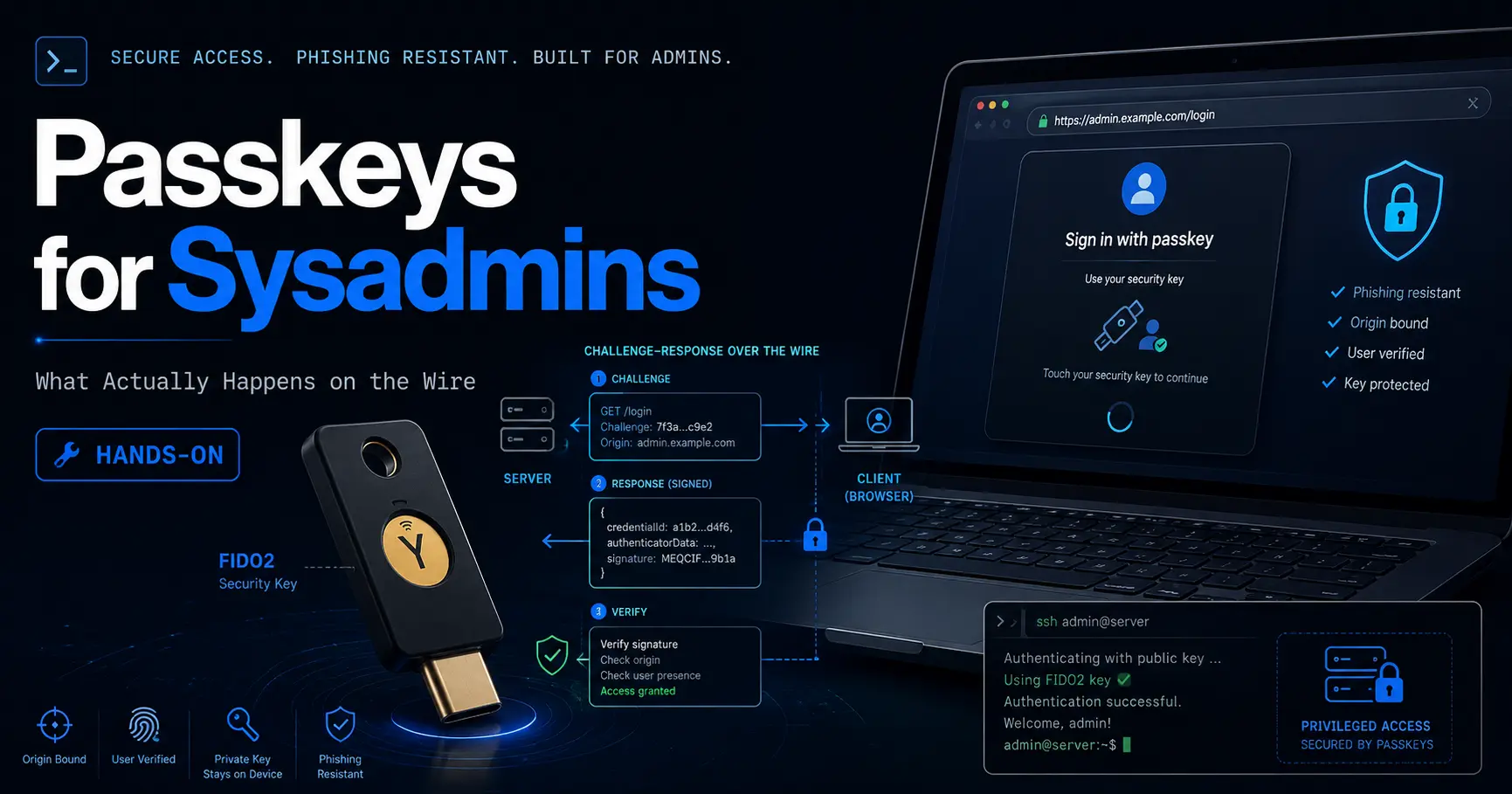
Passkeys for Sysadmins: What Actually Happens on the Wire, Hands-On
If you have been following the authentication conversation on this blog, you already know the verdicts: SMS two-factor authentication is a weak second factor at best, and mandatory password changes made security worse, not better.
Both posts ended at the same door: the future of logins is a passkey, a WebAuthn credential bound to a device, phishing-resistant by construction. What neither post did was open that door and show what actually happens on the wire.
This post is the sysadmin version of that walkthrough. I cover the WebAuthn challenge and response ceremonies step by step, what makes a credential discoverable and why that is the definition of a passkey, how sync moves credentials between devices and what it costs you, why the hardware key is still the sysadmin default, the recovery plan most services forget to ship, how SSH uses FIDO2 without being WebAuthn, and the honest list of places where passkeys do not apply. The reasoning lives in the SMS post and the password post; this one is the protocol.
The short version
- A passkey is a WebAuthn credential, not a password replacement. The authenticator generates a key pair, the private key never leaves it, and the server stores only the public key. A server breach leaks public keys, which are useless without the device.
- Registration and login are both challenge-response ceremonies. The server sends a random challenge, the authenticator signs it after user verification, and the server checks the signature, the challenge, the origin, and the RP ID before it trusts anything.
- The RP ID is the anti-phishing mechanism. The signature is bound to your exact domain. A fake clone of your login page produces a signature bound to its own domain, which your server rejects.
- Discoverable credentials are passkeys; everything else is a prompt for a credential ID. A resident key stores the credential and the user on the authenticator, so login works without typing a username. That is the property that makes passkeys feel like passwords.
- Sync moves the credential, and the trust moves with it. Synced passkeys travel through Apple, Google, or a password manager fabric, end to end encrypted, but the provider account becomes part of your authentication.
- SSH uses FIDO2 keys, not WebAuthn passkeys.
ssh-keygen -t ed25519-skputs the private key on a security key and leaves only a handle on disk. Same hardware, different protocol, no website in the loop. - Recovery is the gap you have to design around. There is no server-side reset for a passkey. Registration codes, multiple enrolled authenticators, and a tested restore path are the plan.
- WebAuthn (W3C)
Level 3, proposed Recommendation 2026-07-20 - OpenSSH FIDO2 support
sk-ecdsa-sha2-nistp256 and sk-ssh-ed25519 since OpenSSH 8.2 - YubiKey firmware
5.2.3+ for ed25519-sk resident keys - NIST SP 800-63B
Rev 4 (2025) with passkey supplement
Checked 2026-08-29 against w3.org/TR/webauthn-3, the Yubico FIDO2 SSH guide, the FIDO Alliance passkey FAQ, MDN WebAuthn docs, and the NIST 800-63B Rev 4 pages. Standards and firmware move fast; re-check before you rely on exact versions.
What WebAuthn actually is
WebAuthn, the Web Authentication API, is the W3C standard that lets a website, called the relying party, register and authenticate users with asymmetric cryptography instead of shared secrets. The user's device or security key is the authenticator. On registration it generates a public and private key pair; the private key stays on the authenticator, and the public key plus a credential ID is stored by the server. On login the authenticator signs a challenge, and the server verifies the signature with the stored public key.
The name passkey is the product word for a WebAuthn credential that is discoverable, meaning the authenticator can present it without the server first naming it. The FIDO Alliance defines a passkey as an authentication credential based on FIDO standards that can be stored on a phone, a computer, or a hardware security key. WebAuthn Level 3, which adds the passkey concept to the spec, was proposed as a W3C Recommendation on 20 July 2026.
Contrast that with what it replaces. SMS codes and TOTP are shared secrets: the server knows the same value the user enters, so a phished code or a server breach defeats them. With WebAuthn the server holds only a public key. There is nothing to steal from the server that helps an attacker sign in.
The registration ceremony, step by step
- The server creates a fresh random challenge and a set of options: the RP ID (your domain), the user ID and display name, the desired algorithms, and policy flags such as userVerification and residentKey.
- The browser passes those options to the authenticator through
navigator.credentials.create(). The authenticator asks for user verification: a fingerprint, a face, or a PIN. - The authenticator generates a key pair, stores the private key (optionally as a discoverable credential), and returns a public key, a credential ID, and a signature over the challenge and the RP ID.
- The server verifies the signature and the origin, stores the public key and credential ID against the user, and the ceremony is done. From now on the user is identified by possession of that authenticator.
const credential = await navigator.credentials.create({
  publicKey: {
    challenge: serverChallenge, // random bytes from your server
    rp: { id: "example.com", name: "Example" },
    user: { id: userIdBytes, name: "admin", displayName: "Admin" },
    pubKeyCredParams: [{ type: "public-key", alg: -7 }],
    authenticatorSelection: {
      userVerification: "required",
      residentKey: "required"
    }
  }
});
The authentication ceremony: what crosses the wire
When the user returns, the server generates a second fresh challenge and sends it with the RP ID. The browser calls navigator.credentials.get(). The authenticator demands user verification again, then signs the data. What comes back is the assertion: authenticator data (the RP ID hash, the user-present and user-verified flags, and a signature counter), the client data JSON (the challenge and the origin), and the signature over both.
The server then runs the checklist that is the whole point of the ceremony:
- The signature verifies against the stored public key.
- The challenge in the assertion matches the challenge the server sent, which is what kills replay attacks.
- The origin in the client data matches the expected site, and the RP ID hash matches the RP ID, which is what kills phishing.
- The user-verified flag is set if your policy requires it.
- The signature counter has increased, which is the defense against cloned authenticators.
const assertion = await navigator.credentials.get({
  publicKey: {
    challenge: serverChallenge,
    rpId: "example.com",
    userVerification: "required"
  }
});
Discoverable credentials: why passkeys mean resident
A WebAuthn credential can be non-discoverable or discoverable. With a non-discoverable credential, the server must tell the browser which credential ID to use by listing it in allowCredentials. The authenticator holds the private key but not the mapping to your account. With a discoverable credential, also called a resident key, the authenticator stores the credential together with the user handle. The server can send an empty allow list, and the authenticator presents the matching credential itself, which is why the browser can show you a list of accounts without you typing a username.
That small difference is the entire passkey experience. A non-discoverable credential is still phishing-resistant, but it needs the server to identify the user first, which usually means a username field. A discoverable credential is the thing the industry calls a passkey: the device is the identifier, and login starts with the authenticator, not with typing.
One hardware note for the future sysadmin: resident keys consume storage on the authenticator. A small security key has room for a limited number of them, so treat resident slots as a resource when you plan enrollment, and use non-resident credentials for accounts where the server can identify the user anyway.
Sync: the credential leaves the device, and trust moves with it
Consumer passkeys are usually synced passkeys. The authenticator material is copied into a cloud-backed fabric, iCloud Keychain, Google Password Manager, 1Password, Bitwarden, and synchronized across the user's devices, end to end encrypted. From the user's perspective that is the killer feature: lose the phone, and the passkey is still on the laptop. From the sysadmin's perspective it is a new trust dependency.
The FIDO Alliance enterprise guidance is explicit about the trade: synced passkeys depend on the provider's synchronization fabric and its security controls. You are adding a third party to the authentication decision, and the account that controls that fabric, the Apple ID, the Google account, the password manager account, becomes a target. If an attacker takes over the sync account, they may be able to recover the passkeys in it.
Hardware keys: the sysadmin default
A FIDO2 security key, the YubiKey and its competitors, is a roaming authenticator that speaks CTAP2 over USB, NFC, or Bluetooth. The private key material is generated inside the key and never leaves it; the key cannot be copied, backed up, or synchronized. Signing requires the key plus a touch, and with a PIN or a biometric, user verification.
For infrastructure accounts this is the right default. The credential cannot be phished, cannot be exfiltrated by malware that reads your disk, and does not depend on a cloud account. The cost is operational: you must carry the key, and you must plan for loss, which is why the standard answer is two keys enrolled on every account that matters, with one stored somewhere safe.
| Feature | Synced passkey | Hardware security key |
|---|---|---|
| Private key lives | Platform secure enclave, copied through the sync fabric | On the key, never exported |
| Sync across devices | Yes, via the provider fabric | No; re-enroll or use resident recovery |
| Phishing resistance1 | Yes, RP ID binding | Yes, RP ID binding |
| Recovery on device loss | Provider account recovery | Spare key or registration codes |
| Trust dependency | The sync provider's account | Physical possession of the key |
| Best for | Consumer accounts, daily logins, convenience | Admin accounts, break-glass, SSH, high assurance |
Private key lives
- Synced passkey
- Platform secure enclave, copied through the sync fabric
- Hardware security key
- On the key, never exported
Sync across devices
- Synced passkey
- Yes, via the provider fabric
- Hardware security key
- No; re-enroll or use resident recovery
Phishing resistance1
- Synced passkey
- Yes, RP ID binding
- Hardware security key
- Yes, RP ID binding
Recovery on device loss
- Synced passkey
- Provider account recovery
- Hardware security key
- Spare key or registration codes
Trust dependency
- Synced passkey
- The sync provider's account
- Hardware security key
- Physical possession of the key
Best for
- Synced passkey
- Consumer accounts, daily logins, convenience
- Hardware security key
- Admin accounts, break-glass, SSH, high assurance
- both are FIDO2
Phishing resistance: what it stops and what it does not
What it stops is the attack class that has defined phishing for two decades: a fake login page that harvests a password and a session. A passkey never sends a secret across the wire, the signature is bound to the RP ID, and the challenge prevents replay. A server breach gives an attacker public keys, not credentials. Credential stuffing is dead on accounts that actually require the passkey.
Here is what it does not stop, and the list matters more:
- Recovery flow phishing. Attackers have moved from login screens to account recovery. If your recovery path is email or backup codes, that path is still phishable. Secure the recovery path with the same standard as the login.
- The password fallback. Most services keep password login enabled alongside passkeys. The account remains phishable through the path that still accepts a password, until you remove or lock it down.
- Malware on the enrolled device. A passkey signs what the browser asks it to sign. If the device is compromised, the attacker can ride an authenticated session or prompt for the same gestures the user would give.
- Sync account takeover. A synced passkey is only as strong as the provider account that controls it.
Recovery: plan it before you remove the password
There is no Forgot passkey button that works. The server cannot reset a credential it does not hold; losing the authenticator without a plan means losing the account. The discipline is the same one this blog applies to encryption keys in the backup post: recovery material is part of the backup, not an afterthought.
- Enroll more than one authenticator. Two hardware keys, or a key plus a device-bound passkey, so one loss is not an outage.
- Store registration and recovery codes offline. Print them, put them in a sealed envelope or a vault, and treat them with the same care as a master password.
- Test the restore path. Recover a test account from the codes and the spare key before you need to do it for real.
- Document the process. The day the admin's laptop dies is not the day to discover the recovery codes were never generated.
SSH and FIDO2: keys, not passkeys, hands-on
Here is where the sysadmin actually lives. SSH does not use WebAuthn passkeys; it uses the same FIDO2 hardware through a separate path that OpenSSH implemented in version 8.2. The key types are sk-ecdsa-sha2-nistp256@openssh.com and sk-ssh-ed25519@openssh.com. There is no relying party and no website-issued challenge: the SSH client asks the security key to sign the session data, and the server verifies the signature against the public key in authorized_keys.
The important difference from a file-based key: the private key never touches the disk. The file ssh-keygen writes is a public key plus a handle that references the credential on the key. Copying the file to another machine does not move the private key; only the hardware can sign.
$ ssh-keygen -t ed25519-sk -O resident -O verify-required -C you@example.com
Generating public/private ed25519-sk key pair.
You may need to touch your authenticator to authorize key generation.
Enter PIN for authenticator:
Your identification has been saved in /home/you/.ssh/id_ed25519_sk
Your public key has been saved in /home/you/.ssh/id_ed25519_sk.pub
Because the credential is resident, you can recover it on a new machine without copying anything private:
$ ssh-keygen -K
Enter PIN for authenticator:
Saved ed25519-sk key to id_ed25519_sk
Saved ed25519-sk key to id_ed25519_sk.pub

# then load it into the agent
$ ssh-add ~/.ssh/id_ed25519_sk
Confirm user presence for key ed25519-sk SHA256:...| Feature | WebAuthn passkey | SSH FIDO2 key |
|---|---|---|
| Standard | WebAuthn (W3C), browser API | OpenSSH FIDO2, no browser |
| Server side | Relying party stores public key and credential ID | authorized_keys stores the public key |
| Challenge | Server-issued random challenge in the browser | SSH server verifies signature over session data |
| Private key location | Platform authenticator or security key | Security key only |
| Discoverable | Yes, that is what makes it a passkey | Optional via -O resident |
| Use for | Web logins and apps | SSH, git, console access |
Standard
- WebAuthn passkey
- WebAuthn (W3C), browser API
- SSH FIDO2 key
- OpenSSH FIDO2, no browser
Server side
- WebAuthn passkey
- Relying party stores public key and credential ID
- SSH FIDO2 key
- authorized_keys stores the public key
Challenge
- WebAuthn passkey
- Server-issued random challenge in the browser
- SSH FIDO2 key
- SSH server verifies signature over session data
Private key location
- WebAuthn passkey
- Platform authenticator or security key
- SSH FIDO2 key
- Security key only
Discoverable
- WebAuthn passkey
- Yes, that is what makes it a passkey
- SSH FIDO2 key
- Optional via -O resident
Use for
- WebAuthn passkey
- Web logins and apps
- SSH FIDO2 key
- SSH, git, console access
Where passkeys do not apply
- Server-to-server and CI. There is no user to present a gesture. Machine identities stay with SSH keys, workload identity, and short-lived tokens.
- Shared and kiosk devices. Passkeys assume a one-to-one user-to-device binding. A shared terminal or a kiosk breaks the model, because the authenticator is tied to one user.
- Legacy protocols and clients. Anything that predates WebAuthn: LDAP, IMAP and SMTP, some VPNs, RDP without a modern client, databases, scripts, will keep needing passwords, TOTP, or hardware-backed tokens.
- Non-interactive automation. Any flow that cannot present an authenticator and take a gesture.
- Environments where sync is forbidden. Air-gapped networks and high-assurance environments often require device-bound credentials, which rules out synced passkeys and may rule out platform authenticators that back up.
- The migration bootstrap. You need a password or a recovery path to enroll the first passkey. Plan the transition so the fallback is removed after migration, not kept forever.
Which should you pick?
- Choose device-bound hardware keys when: you are the person who administers the account, the account is admin or break-glass, you run the infrastructure yourself, offline resilience matters, or the organization forbids cloud sync. The security key is the sysadmin default for a reason.
- Choose synced passkeys when: the goal is mass adoption, users live on consumer platforms, and convenience and recovery matter more than strict device binding. That is most of your user base.
- Choose both when: you want the convenience for daily accounts and hardware binding for the accounts that matter: synced passkeys for the team, security keys for root and recovery.
- Consider neither when: the flow is machine-to-machine or non-interactive. SSH keys and workload identity are the honest answer, and nothing in the passkey world replaces them.
My own rule after running this for a while: passkeys are the right answer for interactive human authentication, and hardware keys are the right answer for the accounts that would hurt. The wire protocol is genuinely good, the phishing resistance is real, and the gaps, sync trust, recovery, password fallback, are all things you can engineer around once you know they exist. The SMS post ended with move to passkeys where the service supports them. This post is the part where you know what you are moving to.
Official sources
- WebAuthn Level 3 (W3C): https://www.w3.org/TR/webauthn-3/
- MDN Web Authentication API: https://developer.mozilla.org/en-US/docs/Web/API/Web_Authentication_API
- FIDO Alliance passkey FAQ: https://fidoalliance.org/passkeys/
- Yubico FIDO2 SSH guide: https://developers.yubico.com/SSH/Securing_SSH_with_FIDO2.html
- NIST SP 800-63B: https://pages.nist.gov/800-63-4/sp800-63b.html
- Our SMS 2FA post: https://systhoughts.com/posts/sms-based-two-factor-authentication-is-no-longer-effective
- Our password change post: https://systhoughts.com/posts/mandatory-password-changes-are-no-longer-effective
- Our backup and recovery keys post: https://systhoughts.com/posts/3-2-1-backup-rule-not-enough-self-hosted-infrastructure
Are you rolling out passkeys yet? Where did you draw the line between synced passkeys and hardware keys, and how are you handling SSH and recovery? Drop it in the comments.
Until next time, keep your systems thoughtful.
No comments yet