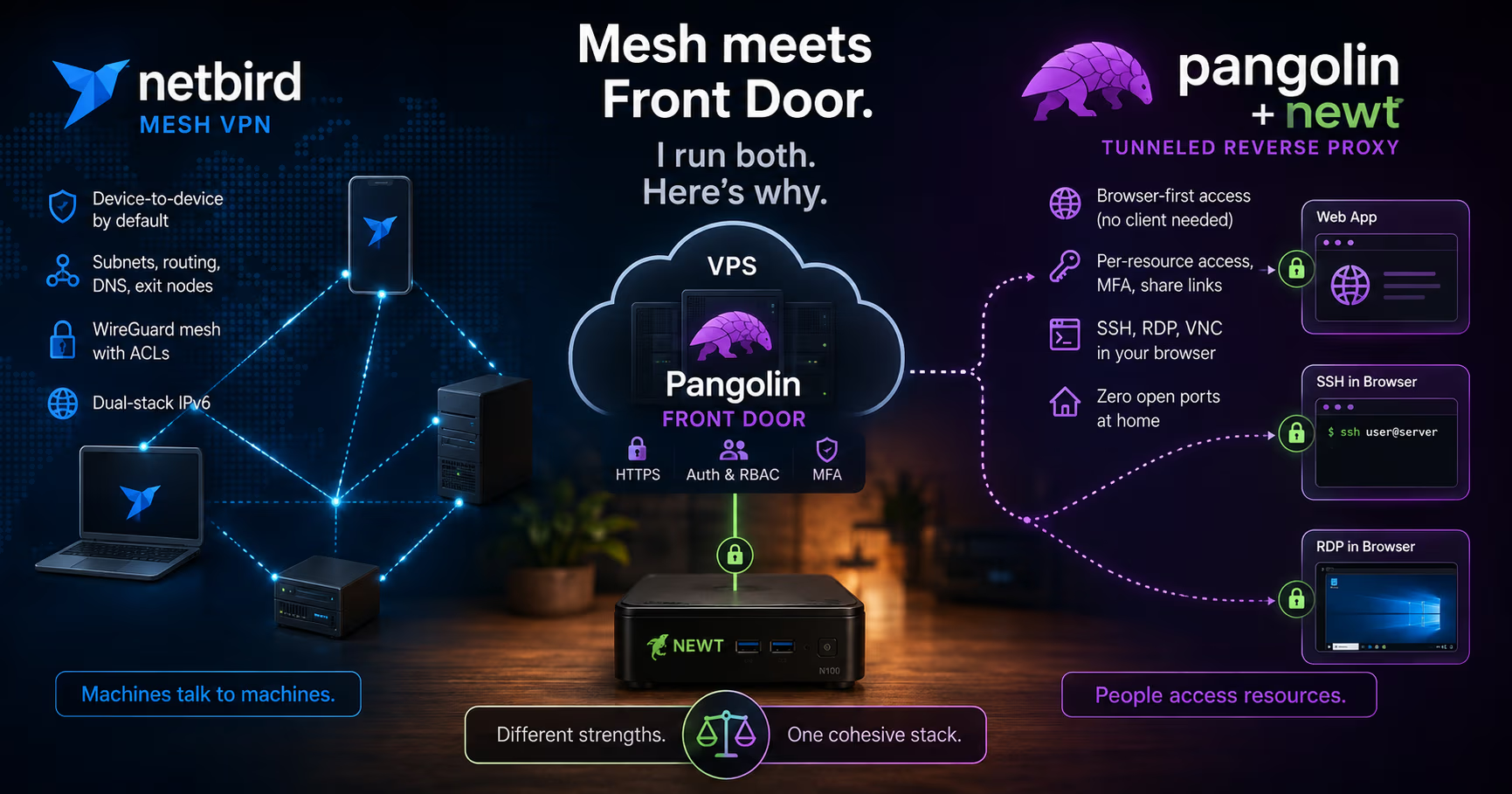
People keep asking me why my homelab exposes everything through Pangolin + Newt instead of NetBird. I touched on it in my n8n review (Newt on the N100, Pangolin on a cheap VPS, zero open ports at home), but the "why not NetBird?" question deserves a proper answer, because the honest answer is that I run both.
The short version: NetBird started life as a mesh VPN (a WireGuard overlay), Pangolin + Newt started life as a tunneled reverse proxy with identity in front. Both projects have spent the last year growing into each other's territory, and by now the feature lists overlap enough that a spec sheet comparison is almost useless. What still differs is the center of gravity. NetBird is a network first, with a proxy bolted on. Pangolin is a front door first, with a VPN bolted on. Pick based on which half you actually need.
Here's the comparison, with real commands, versions, and prices.
- NetBird
v0.76.1 - Pangolin
1.21.1 - Newt
1.15.0
What Each Tool Actually Is
NetBird: the WireGuard mesh, plus an ingress layer
NetBird is an open-source overlay network built on WireGuard. You install a client on machines, they become peers, and each pair negotiates a direct, encrypted point-to-point tunnel. The control plane is three logical services:
- Management, network state, authentication, IP assignment, access control rules. Peers get addresses from the 100.64.0.0/10 CGNAT range, and since v0.71 the overlay is dual-stack, so each account also gets an IPv6 prefix.
- Signal, a lightweight ICE-style candidate exchange that helps peers find each other. No traffic flows through it.
- Relay, a TURN-style fallback for when a direct connection is impossible (Coturn in the older layout, plus a WebSocket-based relay introduced in v0.29.0).
Logically three services, but not three deployments any more: since v0.65.0 the self-hosted setup ships them as a single combined netbird-server container driven by one config.yaml. Since v0.62 there's also an embedded Dex identity provider, so you no longer need to stand up Keycloak or Zitadel just to log in. That change alone cut the self-hosting effort roughly in half.
The client applies access control at the host firewall (nftables), runs an embedded DNS resolver, and the WireGuard private key never leaves the machine. The client is BSD-3-Clause. The server components management/, signal/, relay/) and the dashboard moved to AGPLv3 with v0.53.0 in August 2025. Self-hosting for internal use remains free.
Pangolin + Newt: the identity-based front door, plus a VPN
Pangolin (fosrl/pangolin, ~22k stars) comes at it from the other side. One Pangolin server on a VPS with a public IP is the control plane: dashboard, users and roles, Traefik as reverse proxy, and Gerbil handling the tunnel endpoints. Networks join through sites, Newt connectors that hold outbound WireGuard tunnels with NAT traversal from behind your firewall. No port forwarding, no public IP at home.
What you expose are resources:
- Public resources, browser-based reverse proxies with auth in front: HTTPS apps, plus SSH, RDP, and VNC rendered in the browser. No client on the device you're using.
- Private resources (added recently), hosts, ports, or whole CIDRs reachable only through the Pangolin client (Olm), which behaves like a zero-trust VPN.
Note that the project describes itself these days as an "identity-aware VPN and tunneled reverse proxy". That wording is not marketing drift, it's accurate, and it's the same convergence you see from the other direction with NetBird.
Community Edition is AGPL-3. Enterprise Edition is under the Fossorial Commercial License, free for personal and hobbyist use and for businesses under $100K USD gross annual revenue, but see the licensing caveat further down, because "free" here does not mean "already enabled".
The Convergence Is Real, and Recent
This is the part most comparison posts (including my first draft of this one) get wrong. As of mid-2026:
NetBird has a reverse proxy. Shipped in early 2026, it exposes internal services to the public internet with automatic Let's Encrypt TLS, custom domains via CNAME, path-based routing, and auth at the proxy layer via SSO (your OIDC provider), shared password, PIN code, or nothing at all. v0.72 added private services reachable only from inside your NetBird network, gated by group membership rather than a login page. The self-hosted quickstart even offers to wire in CrowdSec for IP reputation blocking. If you squint, that's Pangolin's public resources feature.
NetBird has browser-based SSH and RDP. Since v0.59.0, the dashboard runs a full NetBird peer compiled to WebAssembly in your browser tab, spins up a short-lived temporary peer, and gives you a terminal (xterm.js) or a remote desktop (IronRDP). No client on the device you're holding. That was Pangolin's headline differentiator for about six months, and it isn't any more.
Pangolin does NAT hole punching and direct paths. Gerbil listens on UDP 21820 specifically to orchestrate hole punching between Olm clients and Newt sites, so client traffic is not automatically hairpinned through the VPS. Pangolin 1.21 went further and added same-network detection, so a client and a site sitting on the same LAN stop relaying entirely.
So the honest statement is not "these are different tools". It's "these are two products racing toward the same feature set from opposite starting points, and each is still noticeably better at the half it started from."
Mesh vs. Tunneled Hub: Where Traffic Flows
The architectural difference is still the thing that drives the trade-offs.
With NetBird, the default is direct peer-to-peer when NAT traversal succeeds, laptop to server, server to server, no middlebox in the data path. Latency is close to the raw internet path. The flip side: it's a network. A peer in the mesh has network-level reach, and your protection is the ACL layer you configure. Traffic that goes through the new reverse proxy is the exception, not the rule.
With Pangolin, machines behind a site dial out to the server and stay connected. Browser access to public resources runs through the server (Traefik terminates TLS, auth happens there), which is the whole point: the accessing device needs nothing installed. Private resources are routed through the site connector, the Newt on my N100, so heavy traffic stays on your hardware instead of hairpinning through the VPS.
Rule of thumb: NetBird's default path is device to device, Pangolin's default path is browser to server to resource. Both can now do the other thing. Neither does the other thing quite as naturally.
Getting Both Running (Real Commands)
NetBird
Cloud is the path of least resistance. Install and connect:
curl -fsSL https://pkgs.netbird.io/install.sh | sh
netbird up
netbird status
For headless servers, create a setup key in the dashboard and register without a browser:
netbird up --setup-key <SETUP_KEY>
Self-hosting is a single script these days. You need a Linux VM with 1 CPU and 2 GB RAM, TCP 80 and 443 plus UDP 3478 reachable, a public domain pointing at it, and jq and curl installed:
curl -fsSL https://github.com/netbirdio/netbird/releases/latest/download/getting-started.sh | bash
The script asks which reverse proxy you want (bundled Traefik is the sane default), whether to enable the NetBird proxy service, and whether to add CrowdSec. It generates docker-compose.yml, config.yaml, dashboard.env, and optionally proxy.env. It deploys with no users, so your first stop is https://netbird.example.com/setup to create the admin account. If you enable the proxy, point a wildcard CNAME *.netbird) at the host as well.
Pangolin + Newt
The installer walks you through edition, base domain, dashboard domain, and Let's Encrypt email:
curl -fsSL https://static.pangolin.net/get-installer.sh | bash
sudo ./installer
It brings up Pangolin, Gerbil, and Traefik as containers. Open TCP 80 and 443, plus UDP 51820 (Newt site tunnels) and UDP 21820 (Pangolin clients and hole punching). Grab the setup token from sudo docker compose logs pangolin and finish admin setup at /auth/initial-setup.
Then create a site in the dashboard, copy the credentials, and install Newt:
curl -fsSL https://static.pangolin.net/get-newt.sh | bash
newt --id <SITE_ID> --secret <SITE_SECRET> --endpoint https://pangolin.example.com
For a persistent connector I run it as a systemd service with credentials in /etc/newt/newt.env:
NEWT_ID=<SITE_ID>
NEWT_SECRET=<SITE_SECRET>
PANGOLIN_ENDPOINT=https://pangolin.example.com
Newt reads those automatically, so the unit file just needs EnvironmentFile=/etc/newt/newt.env and ExecStart=/usr/local/bin/newt. Lock the env file down to 0600, it contains a credential that is as good as a key to your network.
After that it's dashboard work: define a resource pointing at http://n100:5678 (yes, my n8n), pick who can reach it, done. Public URL, auth in front, nothing open on my home router.
What NetBird Still Does Better
- Real mesh networking. Direct peer-to-peer tunnels with proper NAT traversal, as the default rather than an optimization. If laptops, phones, and servers need to talk to each other, not just browse apps, this is the natural fit.
- It's an actual network. Routes to subnets, private DNS with a search domain, site-to-site, granular policies, exit nodes, dual-stack IPv6. This is the Tailscale and Headscale category, and NetBird is a strong member of it.
- Transparent pricing for Cloud. Free tier: €0, up to 5 users and 100 machines. Team: €6/user/month. Business: €12/user/month. Paid plans start from 100 machines plus 10 per paid user, extras at €0.50/month each. (netbird.io/pricing, August 2026.) Self-hosted stays free for internal use.
- Client maturity. Polished desktop and mobile apps, and the Business tier adds device approvals, MDM and EDR integrations, and posture checks.
- Self-hosting got easy. One container, one config file, an embedded IdP, and a script that does the whole thing. This used to be the main reason to avoid it. It isn't any more.
What Pangolin + Newt Still Does Better
- Browser-first by design. The reverse proxy is not a feature of Pangolin, it is Pangolin. Per-resource rules, MFA, geoblocking, PIN codes, share links with optional session persistence, and a resource launcher. NetBird's proxy is capable, but it's a newer surface with fewer knobs.
- Zero open ports at home, structurally. Newt dials out. It works behind CGNAT and restrictive firewalls, and only the VPS needs to be publicly reachable. My router has no forwarded ports at all.
- Resource-level rather than network-level. You grant access to an app, not a subnet. Deploying a site exposes nothing until you explicitly define resources, and everything is audited per user. NetBird can approximate this with ACLs, but the mental model is network with rules rather than nothing, plus what I published.
- Browser remote access with PAM and native SSH mode. RDP, VNC, and SSH in a tab, and since 1.19 a native Pangolin SSH mode that doesn't require configuring OpenSSH and PAM on the target. Requires Newt 1.13.0 or newer.
- Fleet provisioning. Provisioning keys plus YAML blueprints let a single systemd unit onboard thousands of edge devices, with the key wiped from disk after first exchange. Nice if you have more than a homelab.
The Rough Edges (Honest Complaints)
NetBird:
- It's a network, not an access broker. Once a peer is in, your safety is the ACL layer. That's good, but it's a different discipline than per-app rules, and it's easier to get subtly wrong.
- The proxy is the newest part of the product. Treat it as maturing, not mature, and check its current status for your deployment model before building on it.
- Server components are AGPLv3. Enterprises that can't accept that need a commercial license, which means a sales conversation. Fine, but plan for it.
- Patch promptly. v0.76.0 fixed a high-severity local privilege escalation in the client daemon's IPC interface (GHSA-qcpp-8vwj-hhwr): the local control socket accepted any caller without authentication, so an unprivileged local user could enable the embedded SSH server, allow root login, disable SSH auth, and open a root shell. If you enable those settings from a script, they now need
sudo.
Pangolin:
- It's a fast-moving project and it shows. The release notes themselves tell you to back up your config app-data before updating, because you cannot easily downgrade otherwise. That warning has been sitting in the notes for many releases now.
- The licensing nuance most posts miss. Community Edition is not "the full feature set". External identity providers (Google, Entra, any OIDC), RBAC, multi-organization support, branding, and SIEM streaming are Enterprise Edition features. EE is free below the $100K revenue line, but you have to run the
eeDocker image and apply for a license key at app.pangolin.net and activate it at/admin/license. One key per server instance. If you assumed SSO was included in CE, budget an evening for this. - The full stack (Pangolin, Traefik, Gerbil, optionally CrowdSec) is heavier than a single binary on a tiny VPS, though it's fine on the usual €3-5/month box. Ironically NetBird's stack is now the leaner one.
- Private non-web resources still require the Pangolin client on the accessing device. The browser magic does not extend to raw TCP.
- Connector throughput runs through a user-space proxy. For sustained bulk transfers a direct kernel WireGuard mesh should win, though hole punching and same-network detection narrow the gap a lot for client traffic. I have not benchmarked this under load, so treat it as a structural expectation, not a measurement.
What It Actually Costs
| Item | Monthly | Annual | Note |
|---|---|---|---|
| N100 mini PC (electricity) | €0 | €0 | Solar plant |
| VPS (static IP) | €5 | €60 | Range 3-5€ |
| Pangolin CE | €0 | €0 | |
| Pangolin EE (personal use) | €0 | €0 | Free, but requires requesting a license key |
| NetBird Cloud | €0 | €0 | Free tier: 5 users, 100 machines |
| NetBird self-hosted | €0 | €0 | Free for internal use; enterprise/commercial terms → NetBird sales, not community rumor |
| Domain | €1 | €12 | 0.25-1€ |
| Total | €6 | €72 |
So Which One Should You Pick?
Choose NetBird if: you want a device mesh, laptops, phones, VPSes, and homelab boxes talking directly. You need subnet routes, site-to-site, or exit nodes. You like the Tailscale model but want open source with a free self-host path. You'd rather run one container than four.
Choose Pangolin + Newt if: your primary job is publishing web apps and dashboards to people. You want per-resource access with nothing installed on the accessing device. You're behind CGNAT or you simply refuse to port forward. You want browser RDP, VNC, and SSH with a mature permission model around it.
Run both if: you have machines that must talk to each other and apps you want to hand to other people. That's my situation, and it's why I stopped trying to pick.
What I Actually Run
Pangolin on the VPS is the front door. Everything that a human opens in a browser goes through it: n8n, the dashboards, the occasional "can you look at this" link for family. Newt on the N100 holds the tunnel, and my router still has zero forwarded ports.
NetBird is the plumbing underneath. It's what I use when I need to reach a machine as a machine rather than as a web page: shell into a box from my laptop, let two servers talk over a private address, reach something on a subnet that was never meant to be a "resource".
The split has an obvious logic to it once you've lived with it for a while. If a person needs it, it's a Pangolin resource. If a machine needs it, it's a NetBird peer. When I've broken that rule (usually by trying to force raw TCP through Pangolin, or by publishing something through the mesh because I was already there) it has always been more work than doing it the other way.
Could I collapse this to one tool now that both do both? Probably, for a homelab my size. I haven't, because each is still clearly better at its own half, and because the seam between them is the least interesting part of my setup, which is exactly what you want from infrastructure.
What about you: mesh VPN, tunneled reverse proxy, or both? Drop your stack in the comments.
Until next time, keep your systems thoughtful.
No comments yet